
Bounce rate is a fundamental indicator for Digital Marketing.
What does bounce rate?
mean? Its Italian translation is: tasso di rimbalzo.
Let’s understand the logic behind it, then see how to calculate and interpret it in business.
Imagine owning a clothing shop with an attractive window on the city’s main street.
If someone enters, looks around and leaves after two seconds, we can say this potential customer’s visit had a low level of engagement with our business.
In effect, during that visit the person showed little interest in our products.
We could say the visit bounced, as though the customer were a ball coming in and bouncing back out 🏀

Similarly, online, the first page a user sees on our website is the landing page. If there is no interaction, the visitor spends no time and goes back or closes the page, we have a bounced page.
Considering all visits to a particular landing page, it is useful to know the percentage of times that page bounced.
That is precisely bounce rate. For a page X, it is calculated as follows:
Page X bounce rate
=
Number of visits starting on page X that bounced
DIVIDED BY /
Number of visits starting on page X
The resulting percentage tells us how many did not engage with our page.
Likewise, we can calculate engagement rate as the inverse of bounce rate:
Page X engagement rate
=
Number of visits starting on page X that did not bounce
DIVIDED BY /
Number of visits starting on page X
We can also calculate bounce and engagement rates for the entire website or by source channel (e.g. Google Ads campaigns or SEO traffic). In this case, the denominator contains all visits (to the site or from the channel), and the numerator the bounced or engaged visits (to the site or from the channel).
Remember that each visit has one and only one landing page, so the number of visits equals the number of landing pages viewed.
What do bounce rate and engagement rate mean for business?
A high bounce rate (or low engagement rate) is a negative indicator 👎, because people did not find our content and/or offer interesting.
In online advertising, bounce rate deserves particular attention (in my reports broken down by channel, it is one of the first figures I look at, alongside conversion rate). If landing pages dedicated to particular online campaigns record bounce rates above 80–90% (or engagement rates below 20%), it is worth investigating.
The first thing to do is isolate the ‘traffic source’ factor: a high bounce rate (or low engagement rate) may result from an off-target channel with little relevance to our products/services, misleading advertising or landing pages, or, worse, a ‘fake’ source (learn more in the display advertising guide).
Google Analytics 4: reports and calculating bounce and engagement rates 📈
All Digital Analytics tools provide bounce rate both for individual pages (landing pages) and for the website overall.
How does Google Analytics calculate bounce rate and engagement rate?
Suppose we click a Google Ads advertisement after a search and arrive on Page A, which is therefore our landing page.
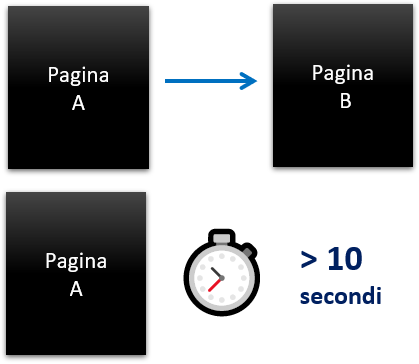
The visit will be engaged if our visitor:
- continues browsing by opening another page on the same website (for example, through a link on Page A leading to Page B)
- stays on Page A for more than ten seconds (with focus on that page)
- clicks an event we configured as a conversion event (e.g. clicks ‘chat with a sales adviser’)
If none of these conditions applies, the visit has bounced and is not engaged.
With the old Universal Analytics version and other platforms, the calculation stopped at points 1 and 3. GA4’s new event-based approach introduced measurement of time spent on the page.
This allows a better assessment of interaction, particularly for pages with more editorial content.
Think of content-rich pages visited from organic searches: for example, I search ‘marketing guide’ and click the first result.
If the page is full of information and I spend 30 minutes reading before closing it, the old calculation system considered it a bounced page, because there was no further interaction.
Introducing time spent on the page changes the result: it is no longer bounced but engaged, having exceeded ten seconds.
Let’s simulate the calculation of bounce and engagement. For example, I have three different visits on three different days (working at visit level, it makes no difference whether they come from the same user):
- Sunday: Page A, then click a link to Page B, then a link to Page C
- Monday: Page B, then click a link to Page A, then a link to Page C
- Thursday: Page A, stay for eight seconds, then close the page
To calculate Page A’s bounce rate (or that of visits starting on Page A), the denominator must contain all visits starting there: in this case, two (Sunday and Thursday). The numerator is one, representing Thursday’s bounced visit.
The final result is therefore a 50% bounce rate for Page A, with engagement rate, by subtraction, also at 50%.
Which reports contain bounce rate and engagement rate?
In GA4, engagement rate appears by default in the report under Reports > Acquisition > Traffic Acquisition.
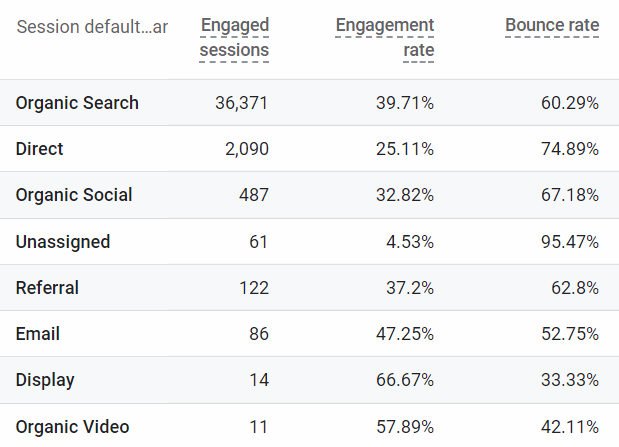
This is the most important report for seeing where visits come from, broken down by acquisition channel.
Engagement rate is among the information we can associate with each channel.
By modifying the standard report, we can also add bounce rate.
Engaged sessions are engaged visits; dividing these by total visits gives the engagement rate.
If a session is not engaged, it automatically becomes bounced.
As the report shows, bounce rate is exactly the complement of engagement rate, so together they add up to 100%.
This report helps us understand incoming traffic quality: there is a direct correlation between engagement rate, time spent on the website and conversion rate.
So watch out for excessively low engagement values.
The acquisition report shows the aggregated figure for total visits and by channel. To see how a particular landing page performs, instead go to: Reports > Engagement > Pages and screens.
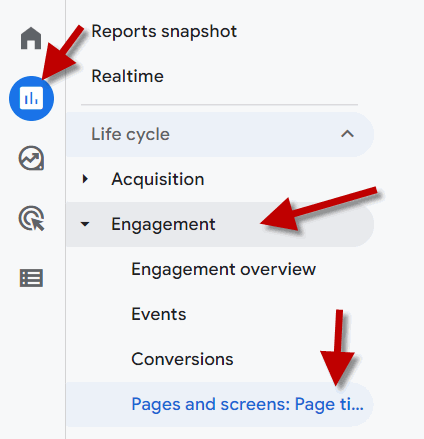
Here, we can filter for the page of interest and find a column showing bounce rate. Unlike the Traffic Acquisition report, engagement rate is not shown, but we can add it by modifying the default report: click the little pencil ✏️ at the top right.
Engagement on social media: Engagement Rate 💍
Engagement rate also exists on social platforms, and is probably better known in that context. Engagement and interaction with published social content are important indicators for measuring a profile’s value and impact.
For example, an Instagram profile with one million followers but low interaction with posts will have less value than one with fewer but much more active followers.
Typically, a profile whose followers are acquired in a less organic and structured way (buying followers) will always show a lower engagement rate.
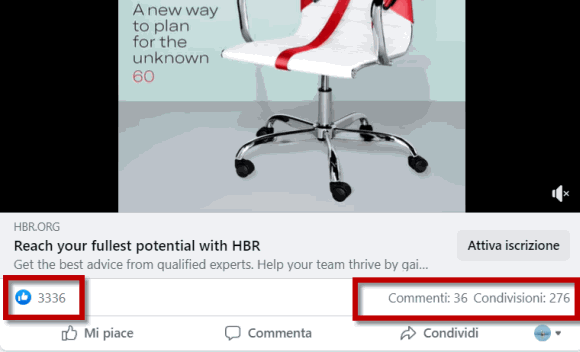
How do we calculate engagement rate on social media?
As with web pages, first define what engagement means.
Generally, on all platforms (Facebook, LinkedIn, Instagram, TikTok, Pinterest, etc.), three content interactions always measure engagement:
- likes
- comments
- shares
We can also add clicks leading to a page outside the platform, and content consumption within the social network: playing a video, viewing a photo gallery, viewing a PDF, etc.
We can calculate engagement at individual-post level (content engagement) or at social-profile level (profile engagement).
In the first case, count all content interactions and divide them by its reach: the number of people (more precisely, social accounts) who potentially saw our post. ‘Potentially’ because displaying a post does not guarantee it caught the user’s attention.
Platforms also show impressions: non-unique views of our posts. If a follower sees the same post twice, that counts as two impressions.
So, if 100 followers saw the post and we receive ten likes, two comments and three shares, content engagement is (10+2+3)/100 = 15%.
When evaluating social profiles and pages (for example, to decide whether to invest in an influencer), we calculate overall engagement rate (profile engagement).
It is very simple. First, calculate average engagement across all posts in a given period (e.g. 6–12 months):
Average engagement/interactions
=
total interactions across all content published by the profile (or page)
DIVIDED BY /
number of pieces of content published
For example, if a LinkedIn profile had 10,000 total interactions and published 20 posts, average interactions are 500.
Then simply use the total number of followers (potential reach) to obtain profile engagement.
Profile engagement
=
Average engagement
DIVIDED BY /
Number of followers
Chiara Ferragni’s profile has 28 million followers. Over the last year, each post received an average of one million interactions, giving a 3.6% engagement rate: an extremely high figure, considering the enormous reach and publication frequency.

The advantage of this calculation is that anyone can do it without access to the profile’s internal insights, since all the main information needed is public.
It also lets us compare different influencers’ profiles.
Follower count is a vanity metric; what matters is the ability to influence the audience reached.
It should be said that both followers and likes are sold today, so a high engagement rate can effectively be bought.
Ultimately, the best way for companies to assess campaign effectiveness is to monitor the increase in traffic and conversions generated on their own website.
For example, Google Analytics can track all traffic from social-campaign links (automatically or through UTM parameters). If a YouTuber creates a video promoting our products, we analyse traffic from the link in its description.
If a direct link to our pages is not possible (because of the platform or message type), we can analyse induced traffic. In particular, we should see an increase in brand searches and direct website visits.
Bounce rate, SEO and its effect on ranking 🥇
We know Google’s ranking engine improves over time and becomes increasingly sophisticated. Its aim is to provide the best content in response to users’ searches.
Among its evaluation factors, Google identifies satisfaction indicators measuring content quality and relevance.
One of these is precisely the bounce rate of the customer experience.
The phenomenon is also called pogo-sticking, referring to jumping from one result to another on the results page.
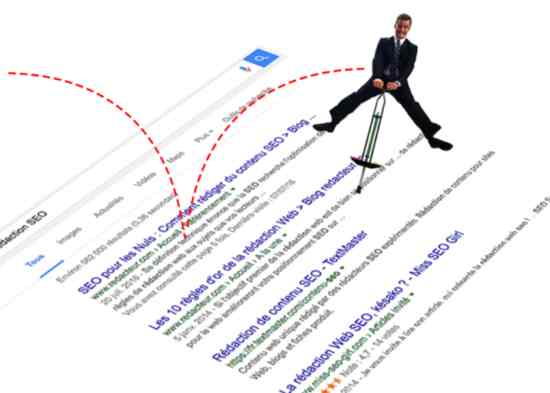
Let’s understand this better through an example.
Suppose we search Google for ‘flow state’, click the first result, then shortly afterwards return to Google and click the third result.
Bouncing from the first result’s page indicates lower quality to Google because the user’s expectations were not met. If this signal is not isolated, the ranking engine may revise the page’s position in the search results (SERP).
Naturally, the opposite also applies.
Analysing bounce rate through Google Analytics matters for SEO too: if our strategic pages have a very high bounce rate from Google/organic, users arriving from search are likely returning to click another result.
Based on the above, this behaviour would negatively affect ranking.
Another factor similar to bounce rate that Google uses as an indirect ranking factor is CTR (Click Through Rate) on search-page results: the percentage of clicks on my page’s link out of every 100 times it appears in the SERP.
If our content receives a click-through rate above the average for its position, Google will consider that a factor in moving us up the rankings.
If my page ranks fourth on Google for a particular search and receives a 10% CTR, while Google’s average for that position is 4.6%, that signals content quality and will lead the engine to move us up.
This factor must be combined with bounce rate: if my CTR is above average but bounce rate is also above average, the effects cancel each other out, and the latter might even carry more weight.