
Google Trends is a free analysis tool available at the following address https://trends.google.com and you do not even need to register to use it.
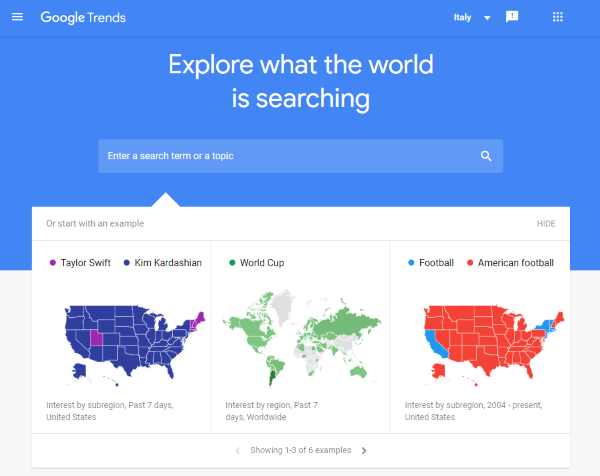
Let us first see how it works, then how to use it for our marketing analyses.
Topics covered in this guide:
- The main features: how to search and interpret the data
- Types of keywords
- How to use it for marketing
- Exploring needs for content marketing, SEO and SEA
- What's new in Google Trends
The main features: how to search and interpret the data
The main function of Trends is to provide information about the most searched keywords on Google's search engine.
Remember that around 6 billion searches are made every day: we search for everything, and there are probably questions we ask only Google!
We start on the home page (shown in the previous image) and, after choosing Italy from the menu at the top right, enter a word or phrase whose search volumes we want to know. For example, let us enter the word: bici (bike).
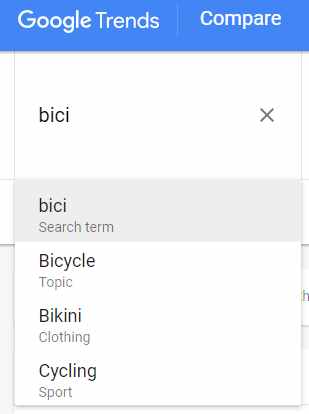
As soon as we type the word, we are asked whether we want volumes for the word as a search term or within a broader or different semantic scope. In this example, we can choose the topic “bicycle” (Google Trends often displays topics in English).
What is the difference?
If I enter “bici” as a search term, I get volumes for searches containing only that word; if I choose the topic, all searches that may refer to that subject are included (for example, searches containing the word “bike” too).
The redesigned Google Trends Explore page lets us compare up to eight items; the older interface shown in these examples supported five. See the updates section for the latest features.
In the following image, we use a comparison to show how volumes for “bici” as a search term are lower than for bicycles as a topic.
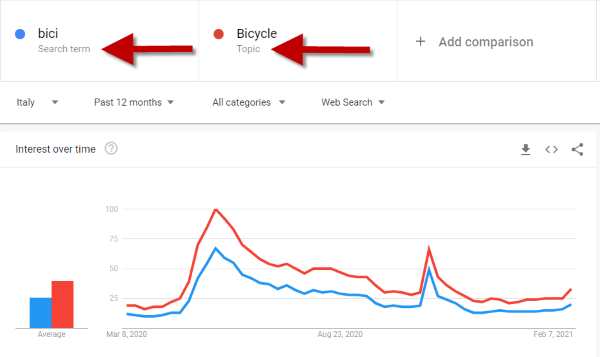
Below the search fields, we see four selection menus.
- Geographic area: the first item lets us obtain only volumes from a specific country (in the example, I selected Italy)
- Time period: the second menu lets us select the time period (the maximum is from 2004 to today)
- Category: this item lets us narrow searches to a category. This feature is very useful when keywords can have different meanings depending on the category. A classic case is a product whose name is the same as a famous person's: to obtain only the product's volumes, we select the relevant category. For example, if a type of rice called Trump exists, I would select the Food category so searches for the former US president are not included in the calculation.
- Search type: the last menu lets us choose the search source, for example image search or YouTube (within YouTube Analytics we can explore in detail what our audience searches for) .
Google Trends shows a relative interest index from 0 to 100, normalised against searches in the selected location and period. A value of 100 represents peak interest within the comparison; zero may indicate insufficient data.
It therefore does not provide the absolute number of searches. The trick for getting around this limitation is to compare against other keywords whose volumes we know (various tools allow this, such as Ubersuggest and Semrush, including the Keyword Planner within Google Ads).
For example, if I know that “fuso orario” (time zone) generates an average monthly volume of 400,000 searches, I simply use it as a benchmark to obtain data for other keywords.
Personally, I remember keyword volumes at different levels, such as 10,000, 40,000 and 200,000, so I can use them for words with fewer searches that would otherwise be difficult to compare.
Types of searches
To make the most of Google Trends, we need to know which types of searches we can perform based on our keywords' match types.
Broad match
This is the main type used by default; as its name suggests, it performs the broadest possible search.
For example, if we search for the two keywords scarpe Nike (Nike shoes), Google will provide all results containing both words in any order, position and combination, such as “scarpe running nike”, “nike scarpe rosse”, “le migliori scarpe da tennis della nike”, and so on.
Of course, if we enter just one word, we will find all searches containing it, either alone or alongside other words.
Phrase match
Phrase searches narrow the scope a little, because we ask for search volumes containing a specific phrase. To do this, put the phrase in double quotation marks (“our phrase”).
So, if we search for “scarpe Nike” we might get results such as “scarpe nike running”, “basket scarpe nike”, “scarpe nike rosse”, etc. In this case, we will not get combinations with words between “scarpe” and “Nike”.
Matching with an OR condition
This type of match tells Google to provide all searches containing one word or the other, using the + sign to combine them. So if we want all searches containing “kayak” or “canoa” (canoe), we simply enter this command in Google Trends: kayak +canoa.
In this case, we get the union of all broad-match searches for each word. This type of search is also useful for including misspellings. For example, for the Starbucks brand, we can search: starbuks +starbucks.
Matching with an exclusion condition
This condition lets us exclude a specific word from the search using the minus sign -.
For example, if we want search volumes for all Nike shoes except basketball shoes, we can write: scarpe nike -basket.
Please note: Google Trends match types work differently from Google Ads. The former uses stricter criteria and does not consider misspellings, synonyms, related searches or other relevant variations.
The reason is clear: Google Ads tries to expand volumes as much as possible to broaden the advertising audience.
How to use Google Trends for marketing
Google Trends is certainly one of my favourite tools. Before the digital revolution, exploring market and social trends required turning to specialist research companies.
Today, by using Google Trends skilfully, we can:
- understand social developments and trends, identify weak signals and see how the world around us is changing
- understand and study trends in other countries and analyse specific regions
- understand the size of demand for a particular need and related needs
- measure awareness of our brand and those of competitors
- observe historical patterns to identify seasonality or related events
To gauge trends and the country's situation, we can take an initial overall look at the Year in Search report for the latest year.
Google produces a nice video summarising the year's most important events worldwide.
The Trending now report shows searches growing rapidly compared with their usual level. Its filters and features are covered in the updates section.
These reports naturally highlight mainstream national topics and offer a perfect snapshot of social trends and the events that have shaped them.
What is the Zeitgeist? What does it mean?
The word comes from nineteenth-century German philosophy and combines “Zeit” and “Geist”, meaning “time” and “spirit” respectively.
The correct pronunciation is “tsight-guyst”.
It can be translated as: the spirit of the age.
The Zeitgeist describes the climate and temperature of a population's culture and values during a particular period or era.
Google Trends lets us capture precisely this spirit: a nation's mood, passing through that small search box.
Imagine a business scenario in which we are considering entering a foreign country about which we know little. A look at the most searched topics of the year in that country provides an initial picture of its sociocultural situation.
Measuring awareness
For brands, Google Trends can be an excellent tool for measuring brand awareness, since brand searches are a very good proxy for it.
We can also relate demand for the brand to market trends and specific events (positive and negative).
For example, let us compare 3 pasta brands: De Cecco, Barilla and Voiello.
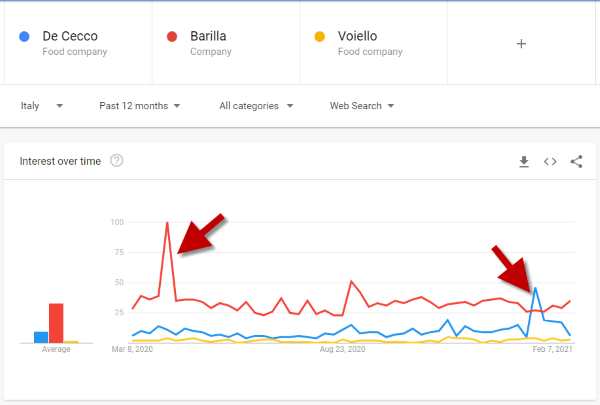
If a brand advertises on TV with good reach, it will certainly see an increase in searches on Google Trends.
This phenomenon is very clear in the comparison between pasta makers: the peaks for De Cecco and Barilla coincide precisely with their advertising campaigns.
Another entertaining detail is the regional breakdown of searches: for each brand, the leading region happens to be where the company is based: Abruzzo, Emilia-Romagna and Campania, respectively.
When comparing brand searches to measure interest in their offerings, we need to account for the size of their customer bases.
For example, if I compare Fastweb with TIM, the latter has a much larger existing customer base (mobile or Internet lines) than Fastweb, so many TIM brand searches are made by existing customers heading to their private area (“navigational” searches).
Studying the market
Another very useful marketing application is measuring a market's size, trends and seasonality.
Suppose we want to launch a new mountain bike brand in Italy and/or open retail stores. To study the market, we can run some simple analyses using mountain bike-related keywords to understand:
- market size: for absolute volumes, compare keywords with others whose volumes we know (as we saw earlier)
- market trends: examine demand over a period of 5–8 years
- seasonality: are some periods stronger than others?
- geographic distribution: which regions show greater demand?
- competitors: also include the 3 leading brands occupying the premium, value-for-money and entry-price positions respectively, to relate them to demand trends.
Seasonality is also essential when planning our advertising campaigns.
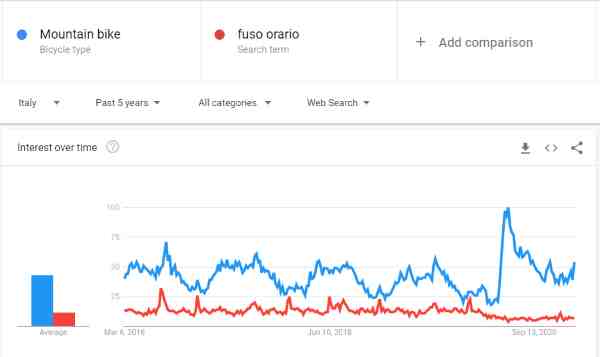
The trend chart for the keyword “mountain bike” over the last 5 years shows a gradual decline in interest, with enormous growth during the COVID period when bicycle subsidies were available.
Seasonality is clear: demand is highest from early April to late September, peaking in August.
I also included “fuso orario” in the chart to help estimate absolute volumes. As we saw, this keyword generates around 400K searches a month; comparing them, we see that “mountain bike” is around 2–3 times “fuso orario”, so we can estimate a volume of 800K to 1,200K searches a month.
The top 5 regions are Trentino-Alto Adige, Aosta, Friuli-Venezia Giulia, Liguria and Piedmont.
These data could suggest where to start opening stores.
Exploring needs and interests for content marketing, SEO and SEA
Besides market analysis, Google Trends is very useful for understanding the semantic context of a market. Which interests and topics matter most? What values and meanings do people share?
With Google Trends, we essentially explore the most searched words, phrases and intentions in our market.
This analysis takes some practice and judgement. We begin with exploratory keywords gathered by talking to customers and salespeople and browsing the web (main questions and problems).
We start entering the keywords collected, looking not only at trends and volumes but also at the related keywords section (see the image below).
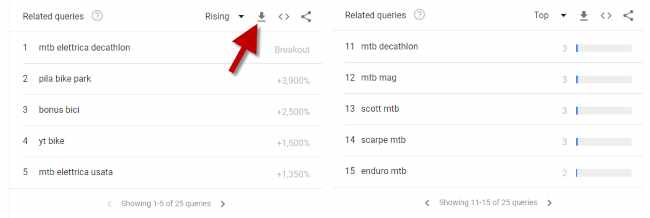
Please note: results can be downloaded to an Excel file (see the arrow in the image). I strongly recommend building a spreadsheet containing all the most interesting intentions and needs.
As we continue exploring, we discover many interesting topics: routes and trails, technique, training, races, materials, accessories, downhill and extreme riding.
We can also immediately see that customers' shared values and meanings include freedom, adventure, nature, discovery, performance and sporting activity, and so on.
Each of these topics can be developed through content marketing with videos, guides, images, articles, and so on.
Moreover, even if we do not want to create content, our Excel file of strategic keywords is a perfect starting point for buying paid keywords on Google Ads (SEA).
What's new in Google Trends: changes and practical uses
Gemini and “Suggest search terms”: start with a need
On 14 January 2026, Google announced its redesigned Explore page with Gemini: we can start with an area of interest and get help choosing searches to compare. Colours and icons distinguish the series, and more rising queries are available than in the previous version. The rollout began gradually on desktop. Google announcement.
- Open Explore and select Suggest search terms.
- Describe your research in What's your area of interest? A possible prompt: “Types of bicycles for commuting in a city”.
- Gemini suggests up to eight terms and compares them. Edit the suggestions and use follow-up ideas to explore further.
- Set the country, period, category and search property, then review the charts and top or rising queries.
Suggestions are experimental: check their relevance and meaning. Google advises against entering sensitive information in prompts. Gemini in Trends help.
The marketing benefit is practical: we can explore a need before knowing all the words people use to express it. A prompt does not prove demand, however. We need the data for the selected searches, interpreted in the right context, to assess that.
Compare up to eight items: check terms and topics
The redesigned Explore expands comparisons from five items to eight, allowing more products or competitors in one analysis. This change is documented in the January 2026 update.
Check the label under each item: a search term concerns the words entered; a topic groups searches about the same concept across languages. This distinction already existed, but it matters especially when automatic suggestions mix both types. Comparing the Italian term “bici” with an international topic, for example, may give an uneven comparison. Google's guide to terms and topics.
Categories and subcategories: a closer look at a market
The category filter was already available and mentioned in this guide. Here is how to go further: in All Categories, search for a category and open its subcategories. In the screenshot below, “Books & Literature” includes “Children's Books”, “E-Books” and “Poetry”. These narrow the scope of the analysis; they are not additional terms to compare.
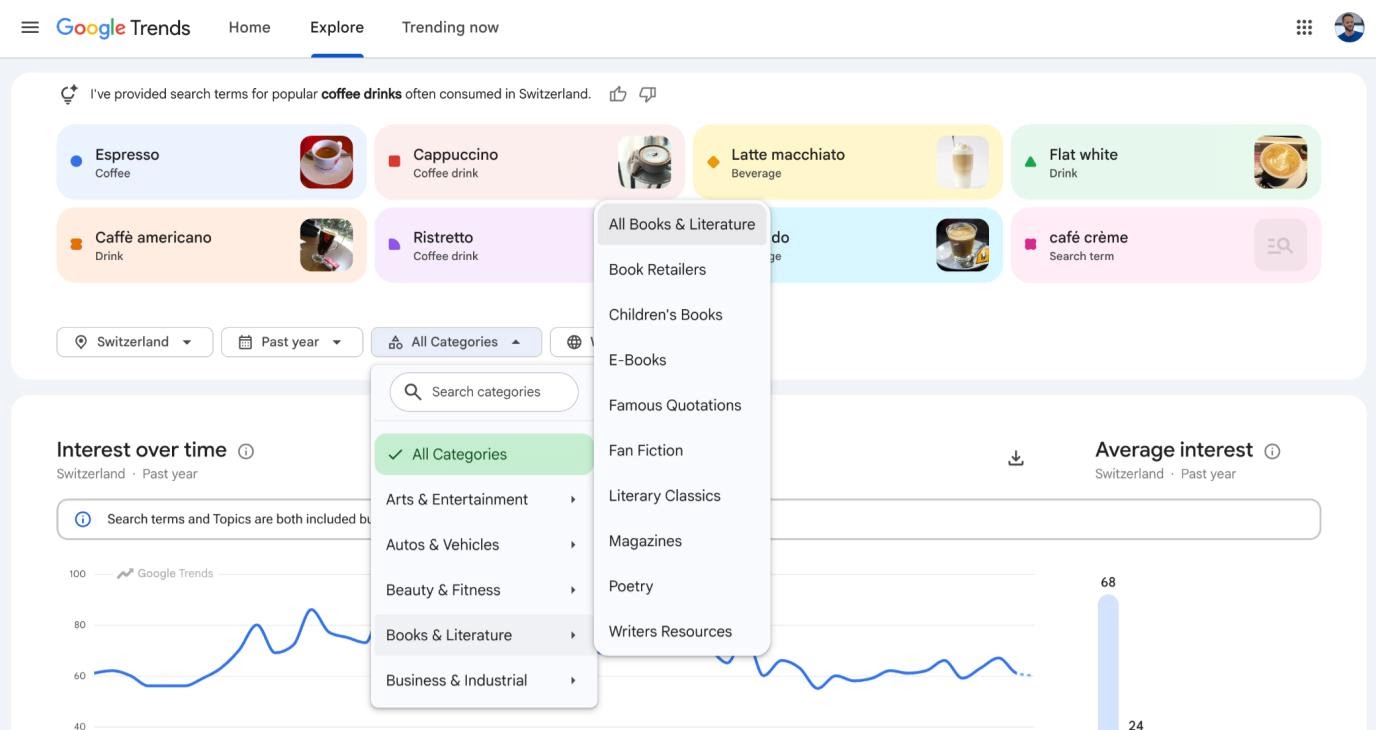
The redesigned Explore: eight comparison items and subcategory navigation. The open menu illustrates the filter structure; it does not mean that books are an appropriate category for analysing coffee.
An ambiguous term such as “jaguar” might refer to the animal or the car: categories help select the relevant context. Category filter help.
We can also leave the search field empty and select a category, country and period to explore sector topics and queries without a starting keyword. An editor looking for emerging interests in their area could use this approach. It is described in Google's content strategy guide.
Quick comparisons with preceding periods
Quick comparison chips above the timeline add a historical line and an average-interest comparison. For the past month, for example, compare with the preceding month or the same period a year earlier. Options depend on the selected timeframe; custom ranges do not offer these benchmarks. Quick comparison help.
For a bicycle shop, this helps distinguish a spring recovery from growth over the previous spring. Before increasing a campaign budget, ask whether the change is a new trend or returning seasonality.
Trending now: fresher trends, filters and exports
On 14 August 2024, Google upgraded Trending now, expanding it to over 100 countries and regions and refreshing data every ten minutes on average. Trend details help establish when a surge began and which news stories accompany it. Google announcement.
The Italy page also offers a category filter. Choose the past 4, 24 or 48 hours, or 7 days, show only active trends and sort results. Details group related queries; export options include CSV, clipboard and RSS. Volume is shown in buckets, unlike Explore's 0–100 index. Trending now help.
For content marketing, use it to follow current events, then check a topic's history in Explore. Not every spike deserves an article: it should connect with our audience and give us something useful to contribute.
The official API and BigQuery for ongoing analysis
On 24 July 2025, Google announced the official Trends API alpha. It supports programmatic analysis across roughly five rolling years, daily, weekly, monthly and yearly aggregation, and geographic data. Consistent scaling across requests helps with comparisons and report updates; the figures still represent interest, not absolute counts.
As checked on 30 October 2026, the official API page still requires an alpha application: access is not automatically open to everyone.
Public BigQuery datasets are another option, covering the top 25 and top 25 rising queries in the US and around 50 other countries. Query them with SQL for analysis and dashboards. These selected datasets do not replace every custom Explore search; BigQuery has its own free limits and charges. Dataset help.
A home page for discovering topics, resources and examples
Back on 8 March 2023, Google redesigned the home page to highlight trends, related news, tutorials and editorial projects using the data. It is a useful starting point for inspiration before defining an analysis. Home page announcement. To research a specific subject, go directly to Explore.
What still matters when reading the data
Explore's 0–100 index is relative to the chosen context. Zero can indicate insufficient data; 100 does not mean one hundred searches. The comparisons with known-volume keywords in the earlier examples are rough estimates, not a reliable conversion into monthly searches or market size. How Google normalises the data.
The workflow is straightforward: define a need, explore alternatives with Gemini, choose comparable items, narrow the context and check seasonality. Then turn what you have learnt into content, offers and campaigns.