
What are heuristic analysis and heuristics?
Heuristic evaluation is a method for assessing the User Experience of a digital product carried out by UX experts. The analysis identifies any problems encountered while using the interface.
In practice, an expert uses our website, app or any user interface and checks its compliance with specific qualitative guidelines defined by the expert community.
The rules within the guidelines are called Heuristics and tell us how the dialogue between user and interface should work.
They should not be confused with heuristics in cognitive psychology, although they share a practical, efficient foundation: usability heuristics define how an interface should behave correctly and immediately.
In scientific language generally, a heuristic refers to a hypothesis taken as a guiding idea in the search for facts. A heuristic method is also a research method conducted through a heuristic tool (in UX, that tool consists of our usability rules and best practices).
How to carry out a heuristic analysis
The analysis requires an expert to use our interface, simulating an ordinary user's experience.
They follow the main navigation paths and perform the most important tasks the interface is designed for.
For an ecommerce website, for example, they view product pages and, importantly, complete an entire purchase flow.
The best protocol is to use 3 different usability experts who analyse our digital product independently and separately.
Experts can use several sets of guidelines, but the most effective and widely used today are Jakob Nielsen's 10 heuristics (see the next section).
Each expert completes a record of the problems found. These are then consolidated into a single final document, also including severity levels and useful guidance for whoever must build or improve the interface's usability.
Heuristic analysis can be carried out both before and after a new digital product launches.
For example, when redesigning a website, it is good practice to analyse the existing site. When launching a new one, we can work with prototypes, since this method allows analysis of even very early, low-fidelity prototypes or wireframes.
The strength of this analysis is its flexibility and practicality; if the company has usability experts, the process can also be continuous, with incremental improvements (a Kaizen strategy).
To obtain different perspectives, it is generally advisable to complement internal analysis with external experts (for example, one or two of the 3 experts could be external).
Jakob Nielsen's heuristics
As we said at the start, heuristic evaluation requires a set of guiding rules against which to analyse the interface.
Danish expert Jakob Nielsen's 10 usability rules or principles are the most widely used by experts worldwide to evaluate User Interface Design. Let us examine them one by one.
1️. Visibility of system status
The system should always keep users informed about what it is doing, providing appropriate, timely feedback.
When users know the system's current state, they learn from previous interactions. Those interactions become predictable, building trust in the product (and therefore the brand).
The interface must communicate constantly and quickly with users, providing context and showing what they can do.
A classic example in a purchase flow is knowing where I am and which steps remain before completion.
For example, good practice is to show the steps in a purchase flow and highlight the user's current position.
Other examples include breadcrumbs and progress or loading bars, which tell users that the system is processing data or a request and that results will arrive soon (without them, users would not understand what was happening or whether their interaction contained errors).

Example of breadcrumbs on the Harvard Business School website
Error messages and guidance for completing form fields are elements of system status visibility.
2. Match between system and the real world
The system should speak the user's language, using familiar words, phrases and concepts.
Things that are clear within the company may not be clear to our users.
For example, users understand a fast Internet connection or line, rather than a wireline broadband connection.
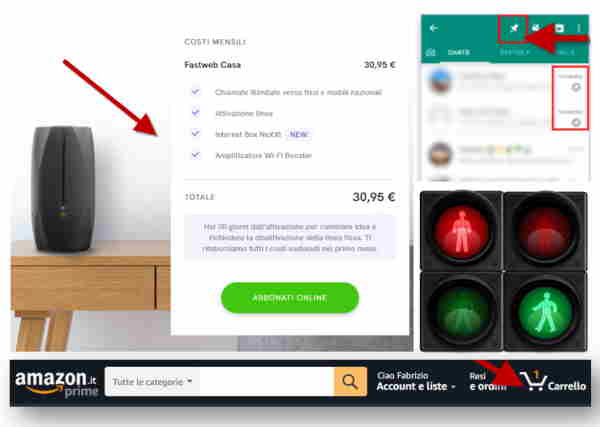
Examples of real-world metaphors
Obviously, much depends on your audience. Talk to potential customers or users to understand their language and terminology. Do not take things for granted.
Design for your customer, not for yourself or the CEO 😁😁
People have mental models or theories about how a system works, based on past experiences with real-world objects. When they move from the physical to the digital world, they bring those interpretations with them.
Follow real-world conventions, presenting information and interactions in a natural, logical and predictable order.
For example, adding a product to the basket and proceeding to checkout on an ecommerce website follows a mental map built in the physical world.
Icons draw extensively on the real world: think of pin/unpin or perhaps the world's best-known metaphor, the bin 🗑️
3. User control and freedom
Users should control navigation and move freely among the various elements and content.
Users often perform actions by mistake, so easily identifiable emergency exits must be provided.
Functions for going back, skipping, undoing, removing an option, deleting or closing an interface object are essential to avoid leaving users stuck in a dead end.
Have you ever encountered a popup on a website and been unable to find how to close it? That is an example of a violation of the control and freedom heuristic.
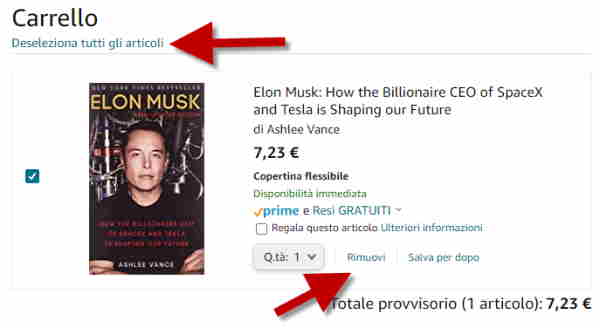
Example of exit points in Amazon's basket: I can remove a single item or all items
Other examples of respecting “control” include returning to the home page in one click (for example, on the brand logo) or having an internal search engine on the website.
Interaction design and navigation structure should allow natural alternative paths and make switching between them easy.
Users should feel as free as possible and easily escape situations where they are stuck, avoiding frustration.
Good control increases the sense of trust in the interface and therefore in the brand.
4. Consistency and standards
Users should expect system conventions to apply throughout the interface.
We speak of internal consistency in our website or digital product when the interface behaves the same way regardless of the area I am in or the action I take.
For example, if a second-level menu behaves in a certain way, it should do so on every page.
External consistency or standards, on the other hand, means adopting usability and UX design conventions used in the market.
For example, in responsive mobile web UX, the convention is to use a hamburger menu with its corresponding icon, opening on tap.

The hamburger menu takes its name from the three-layer sandwich 🍔
Jakob's Law states that people spend most of their time using digital products other than yours. Their experiences with those products shape their expectations.
In practice, users prefer your website to work like the other websites they already know and can use. The common-sense recommendation is to design interaction patterns users are accustomed to.
Following standards is one of the most important and sometimes controversial points.
Inconsistency, particularly violating UX conventions and standards, is very dangerous because it increases users' cognitive load by forcing them to learn something new.
A convention is not a personal opinion: it is an objective fact.
Clearly, we must also pay attention to the context of those conventions.
If I walk into a café in Abruzzo and ask for a “cornetto”, I get a croissant; if I walk into a café in Milan, I get an Algida ice cream 😂
In semantics, this is called polysemy: the same word or entity takes on different meanings depending on the context (“Panda” can be a car, an animal or antivirus software).
To respect this heuristic, it is useful to use consistent grids, tone of voice and patterns and build a single Design System (libraries of design elements to reuse across interface areas). It also requires constant market study to identify new trends that will become standards.
A standard should be broken only when there is an objective benefit for users; otherwise, it makes no sense. The line between innovation and damnation is very thin 😲😭
A good UX expert is an avid web user, but an avid web user is not automatically a UX expert 😉
5. Error prevention
Avoid putting users in ambiguous or difficult situations that could lead to errors.
The interface should be intelligent and prevent errors before they happen.
There are two types of errors:
- slips
- mistakes
The first result from insufficient attention. This often happens when we try to do several things at once; since multitasking does not exist we risk doing several things badly.
For example, I enter an address in a form field asking for a phone number.
Mistakes, in the strict sense, are conscious actions based on a mismatch between the user's mental model and the design: I genuinely thought the field required an address rather than a phone number.
A good interface helps prevent both slips and mistakes.
There are various prevention systems: guided paths, suggestions and previews (for example, showing what an input field should contain and in what format), default options, autocomplete and input restrictions (although restrictions are generally undesirable, they are appropriate here if clear rules lead to acceptable options).
But the best example of UX working to prevent errors is certainly the system of “inline validation” in data entry forms.
As users enter data, the system provides real-time feedback on its correctness and suggestions for completing the form.
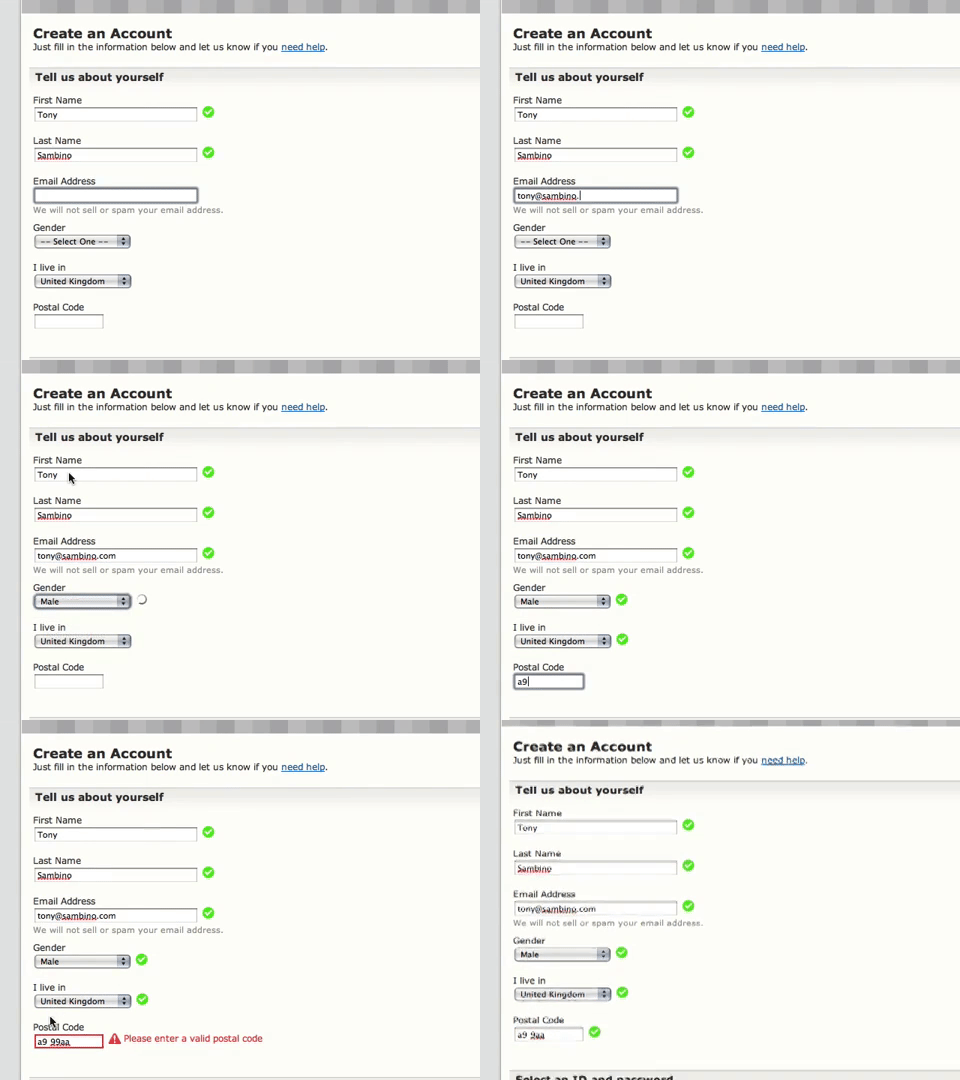
Example of a form with real-time validation during completion
Errors begin with our mental models and expectations of how something works.
When people interact with a website or app, they start with a goal and, based on their mental model, form an action plan to achieve it. They then act and try to verify that their action produced the desired results.
User interface design should reduce the gap between how users expect it to work and how it actually works.
6. Recognition rather than recall
Instructions for using the system should be clearly visible and easy to retrieve.
We must minimise the need to memorise interface elements and recall them while navigating (as with other heuristics, the aim is to reduce cognitive load and errors).
We should focus on recognition rather than recall, so all information about where I am, where I came from and where I can go should be easy to retrieve.
All elements, objects, actions, items and options should be visible.
Users should not have to remember information while moving between pages or screens.
Instructions for using the system should also be visible or easily retrieved when needed.
The difference between recall and recognition depends on the number of clues and contextual aids users have to understand what to do.
Let us use a small analogy to explain this difference.
If I ask you for Germany's capital, that is a pure recall exercise (if you remember, fine; otherwise, you cannot answer).
But if I ask, “Is Berlin the capital of Germany?”, I have created a context that greatly reduces recall effort and shifts the task towards recognition.
If you have already heard the answer, everything becomes easier (translated to our interface, this means you have already seen a specific option or feature).
How easily information can be retrieved from memory depends on how frequently we have encountered it, how recently we have used it and how closely it relates to the current context.
The context should aid recognition by offering cues to remember information.
For example, we can help users by placing a persistent label on a form field indicating the type of content required.
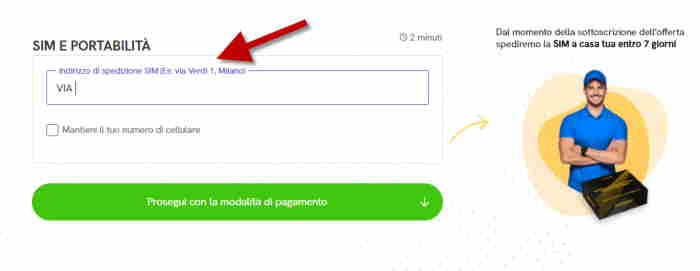
A label reminding users what to enter, with an example so they do not have to remember the format
It is also useful to prepopulate the field with an example of the format we expect users to enter.
Other best practices include:
- providing information on recent searches or selected options (e.g. in ecommerce)
- contextual baskets
- self-explanatory mega menus
- descriptive menu labels and all contextual aids
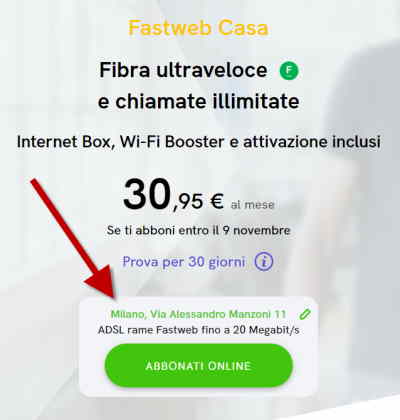
The system remembers the coverage-check data for the user
7. Flexibility and efficiency of use
The system should be flexible and support different levels of use, from beginners, who typically navigate hierarchically, to experienced users who want shortcuts to get to the point.
When building UX, and an online proposition in general, the challenge is to satisfy all possible audiences while considering their different mental maps.
Less experienced users need guidance and reassurance, while experts need to move faster: they want their time respected and want to get straight to the point (naturally, according to the digital product's objectives).
In software user interfaces (e.g. Photoshop, Office, etc.), one solution is keyboard shortcuts that activate features we already know well (such as the famous Ctrl+C and Ctrl+V).
Examples of different patterns often appear on ecommerce platforms such as Amazon: the user journey may involve a series of steps (product snippet, product page, add to basket, delivery section, payment section and order confirmation), or a purchase in a single click!

Example of purchasing on Amazon
For example, an alternative navigation path for beginners is a configurator that guides them towards the best offer for their needs and requirements.
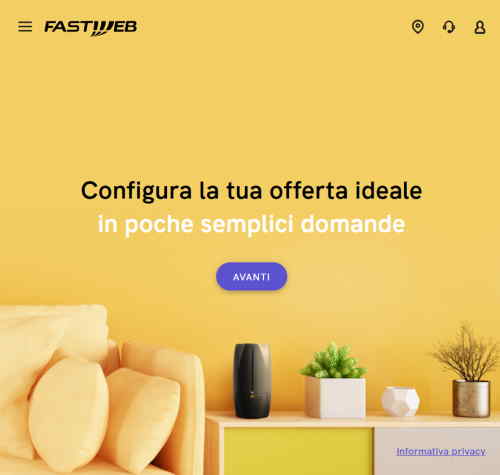
Alternative path for buying a Fastweb offer through a configurator
8. Aesthetic and minimalist design
This heuristic tells us to avoid introducing irrelevant information (noise), because it takes visibility and attention away from important elements (signals).
In human-computer interaction, the signal-to-noise ratio represents the ratio of relevant to irrelevant information in an interface or communication channel.
Cognitive psychology tells us that every additional element on a page dilutes the attention each one receives (even if the page can technically accommodate them).
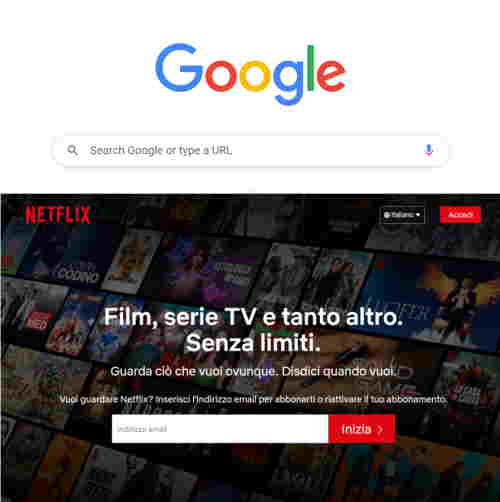
Google and Netflix are two examples that focus on relevant elements and reduce noise in different ways
Nielsen's mantra is: Less is More!
When building our UX, we must maximise the signal-to-noise ratio (and for a given signal, reducing noise is fundamental).
I like to use the metaphor of a room to illustrate this concept.
If we enter a room and everyone speaks to us at once, we will understand nothing 😜
To start understanding, we need order: perhaps we line people up and let them share their thoughts one at a time.
But our attention and recall will be inversely proportional to the number of people we speak to.
Applied to the interface, this means not only reducing the number of objects or messages (people), but also putting them in the right logical sequence so they make sense.
If they do not make sense and/or add no value, they should be removed.
Defining a hierarchy of concepts and objects is fundamental.
Clearly, this must be considered in the context of the interface's goal: an ecommerce page differs from an in-depth article in an online magazine (where “more is better”).
In general, excluding editorial digital products, the rule is to remove rather than add anything that does not provide value.
Nielsen is an extreme minimalist, but we must avoid applying this heuristic dogmatically: modern neuroscience tells us how important visual and emotional aspects are too.
The art of UX is to use images, colours, videos and shapes that add value without taking centre stage in the interface, instead creating the right mood (good feeling) to convey our message and help users (and the UX owner) achieve their desired objective.
In conclusion, this is one of the hardest heuristics to respect and interpret.
9. Help users recognise, diagnose and recover from errors
Error messages should use clear, explicit language: internal codes that mean nothing to users are therefore unacceptable.
People using the interface must understand the problem, and we should, where possible, provide information for resolving it or achieving their objective another way.
For example, suppose a company's customer area is inaccessible because of backend problems or downtime. First, I explain clearly that technical problems have made the private area unavailable, then offer alternatives for customers' possible needs: if you need support, call xxxx; if you need manual xxx, click here, and so on.
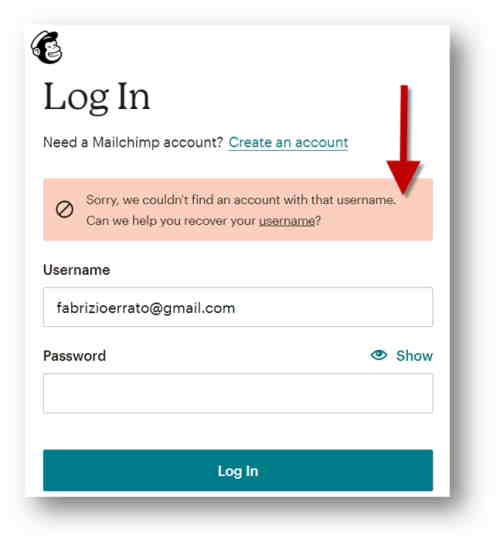
An excellent example of an error message during Mailchimp login
Respecting this heuristic may seem straightforward, but the problem is that errors often arise that have not been accounted for, and backend systems return them in an incomprehensible form.
10. Help and documentation
The final heuristic tells us that, even when our UX is clear and well designed, if some actions or areas require user support, we should provide additional help and/or access to detailed documentation.
This applies widely to online software as a service (SaaS), which needs guides and documentation to help people make the most of available features.
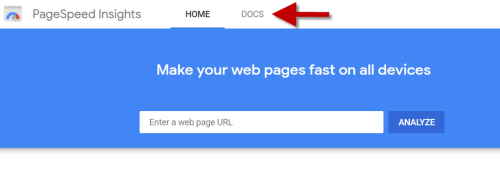
Google PageSpeed with supporting documentation clearly highlighted
Presenting the results of heuristic analysis
To conduct an orderly analysis and then present the results, it is useful to create a template collecting everything.
I recommend an Excel sheet with one row per heuristic and additional subrows for each problem found (see the spreadsheet image below).
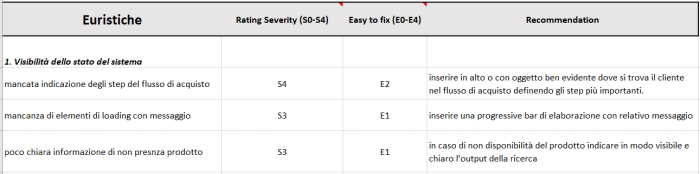
Example of a heuristic analysis template
In the columns, we will enter:
- Severity rating: the increasing severity of the violation, from 0 to 4 (where zero means there are no problems for the specific heuristic)
- Easy to fix: indicates how difficult the violation is to resolve, again with an increasing value. For example, E1 indicates a very simple fix.
- Recommendations: here, the UX expert suggests solutions to the problem. For example, they might suggest adding a progress bar to show that the system is processing our task.
Once the Excel sheet contains all the analysis information, the next step is to prepare the presentation of results.
Starting from the spreadsheet, we simply create one slide for each problem identified (naturally, an introduction explains the analysis methodology and how it was carried out):
- The relevant heuristic (e.g. Flexibility)
- The task performed when the problem was detected (e.g. completing a registration flow)
- The problem, with its severity and ease of resolution (e.g. S3 E2: during a flow, there was no way to go back or delete data)
- A screenshot highlighting the problem
- Finally, the recommendation (e.g. adding a link to go back or delete data).