
We live in the information age, and the sources available today to feed our knowledge are almost endless. However, this abundance also creates information overload.
In marketing, and generally in any discipline, it is extremely important to build an intelligence system based on a network of sources to monitor constantly.
Imagine having 50 websites in our sector to monitor continually: doing it by visiting them all is practically impossible.
The tool that saves our lives, and that I could not do without, is the feed reader. The best product on the market today is undoubtedly Feedly.
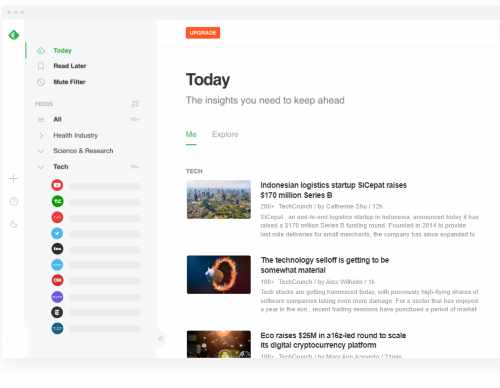
What does a feed reader?
do? It aggregates content from different sources, which is possible thanks to the RSS feeds made available by websites (almost all of them today).
Today, the word feed is widely used in a broader sense as a shortened version of social networks’ news feeds: the main page where we see all the content from our contacts. Thus we have the Instagram feed, Facebook feed, Twitter, LinkedIn, etc.
For example, this is the feed file for Google’s Chromium website, where all Chrome updates are published: http://blog.chromium.org/feeds/posts/default.
If we open it in an ordinary browser, we see an XML file with the latest published content: the date, title and part of the content itself (sometimes the whole article, as in Chromium’s case).
This file, which is difficult to read in a browser, is read by the feed reader, with the advantage of displaying the articles in chronological order.
Let’s see how to use the Feedly feed reader to bring up to 100 aggregated sources together in one place (in the free version, or 1,000 in the paid version).
First, register on www.feedly.com:

Once logged in, create your content categories and then connect the sources.
First, create a feed category from the left-hand menu by clicking ‘Create New Feed’ (the free version allows up to three categories).
Now connect the sources to the categories by clicking the + symbol in the left-hand menu (see image below).
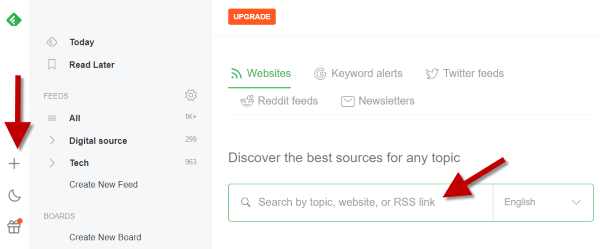
In the search field on the right, enter the link to the RSS feed you want to connect. If you do not know its address, that is not a problem: enter the URL of the website you want to monitor directly, and Feedly will retrieve the correct RSS file.
For example, suppose we want to check daily for new content and updates from the Harvard Business Review: enter the relevant address, www.hbr.com, in the search field.
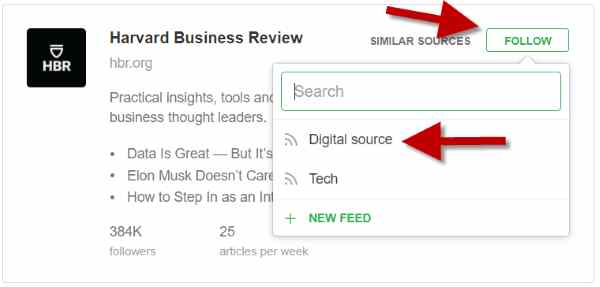
Feedly immediately shows the Harvard website. Clicking ‘follow’ adds it to our dashboard, and the dropdown menu lets us assign it to one of the categories created earlier (in the example, I had created Digital source and Tech).
Once the sources are connected, when we return to Feedly and click ‘Today’ on the left, we see updates from our websites with date, title and abstract.
From the day’s content page, we can click the ‘Explore’ tab, which shows other content aligned with our sources.
The dashboard is a considerable advantage: in five minutes, we can monitor everything happening in our market and areas of interest.
Feedly is an essential tool for marketers and those working in content marketing and social media, because it keeps us on top of current content (to be combined with Google Trends and tools such as Ubersuggest and Semrush).
A new, convenient feature is creating boards (by clicking ‘Create board’ in the left-hand menu). These are thematic containers for saving the most interesting articles. For example, I could create a board called AI for artificial intelligence and save articles suggested by feeds in my Tech category (seen earlier).
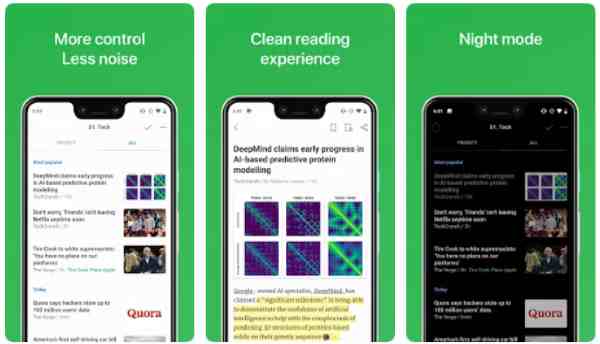
I strongly recommend installing the app (Android - iOS) for quick, convenient access to your dashboard whenever you have five minutes (instead of the usual social media 😉
Finally, the Feedly mini extension for Chrome can also be useful: it lets you add a source while browsing it, without having to enter Feedly to add it.