
Google Alerts is a very simple but extremely useful tool for constantly monitoring new material on the web found by the world’s most powerful search engine.
With this tool, we can set up alerts for new content on a specific topic and receive notifications by email.
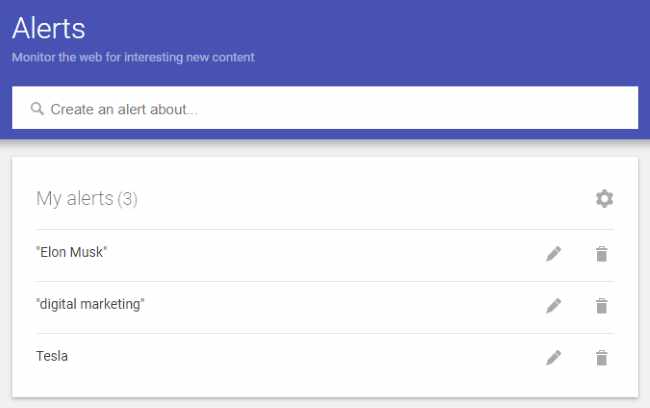
What we can use it for:
- to monitor all new content that mentions our brand or company. For example, if we enter ‘Tesla’, we receive all new material published and found by the search engine that mentions Tesla. In practice, it is a free tool for analysing sentiment towards a brand
- to monitor competitors, keeping track of all their communications, activities and new market launches
- to discover new articles and material on a specific topic, such as artificial intelligence, digital marketing, etc.
- to monitor news about a public figure we are interested in, such as Elon Musk
- to receive notifications about updates within a website (in this last case, where possible, I recommend using a feed reader such as Feedly)
- for SEO, to find out who mentions us (we now know that mentions also affect the ranking of our pages) and do link building by asking them to include our link alongside the mention
How do you set up alerts? How do you receive them by email?
- go to https://www.google.com/alerts and enter the word/phrase you want to monitor in the search field at the top. In the image above, for example, I entered ‘Elon Musk"
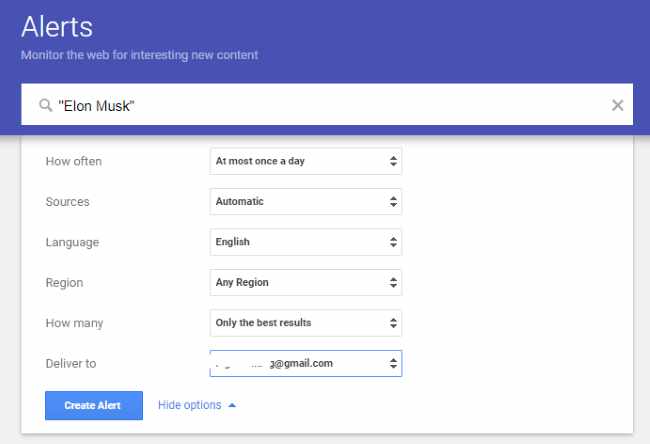
- the next step is to click ‘create alert’ or ‘crea avviso’, choosing the options on the right. We can choose how often to receive updates, the sources (automatic is best), the source language, the geographical area of the source and the number of results (the best ones or all of them)
- the last option is the inbox where you want to receive the email with update notifications. If you are already logged into a Google account, it will be prefilled with that email address; otherwise, you will need to enter an email address at the start.
Alerts with advanced searches
As you might guess, the syntax used to enter the alert term is the same as for the search engine, so we can also take advantage of all the advanced searches.
To keep up with new material on www.hbr.org, for example, we would enter the following alert: "site:www.hbr.org".
If we want to create alerts for all review articles mentioning our brand (Tesla, for example), we can enter the following: tesla intitle:recensioni, where the intitle command lets us find all content with the keyword ‘recensioni’ (reviews) in its title.
We can combine this with the site: command. For example, to find questions on quora.com about our products (e.g. Bianchi bicycles), we create the following alert:
"bici bianchi" site:www.quora.com