
What is ChatGPT?
Put simply: it is a chat where you can talk to a computer and ask it questions, and it replies as if it were a person.
The CHAT is the interface (UI – user interface), the point of contact that receives and responds in text, while the engine behind it is the language model (GPT).
The chat’s interaction model is called a conversational model.
It is important to say that ChatGPT is not GPT-3!
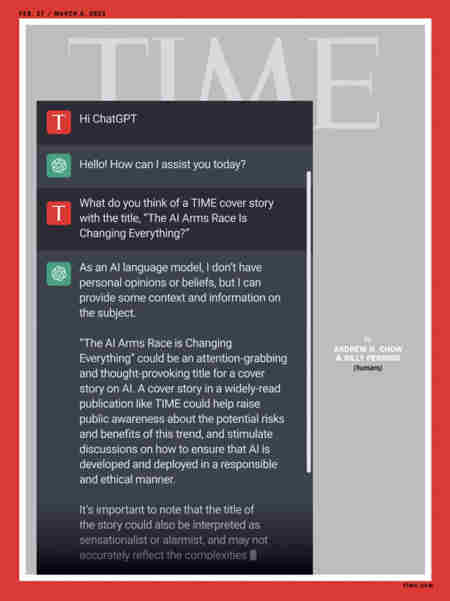
Technically, they are both large language models, but there are differences.
Let’s first look at what GPT-3 is and how it relates to ChatGPT.
What GPT-3 and InstructGPT (or GPT-3.5) are
GPT-3 (Generative Pre-training Transformer) is a general-purpose generative language model based on deep learning (based on the Transformer neural network architecture) applied to NLP (Natural Language Processing). It uses neural networks trained on content from large sources and automatically understands and generates text by estimating the probability that the next word will make sense in the given context.
The model can also perform many text-processing tasks, from translation and summarisation to producing very long written content (books, documents, screenplays, etc.).
Natural language processing (NLP) is a branch of computer science and artificial intelligence that enables computers to understand text using computational linguistics and rule-based modelling of human language.
In practice, NLP enables computers to recognise characters, words and sentences, and therefore recognise the semantic meaning of texts.
GPT-3 was trained on almost 800GB of text information gathered from the Internet, Wikipedia and digitised books.
Through neural networks, all these words are connected to one another (using 175 billion parameters), allowing the system to create a statistical/predictive model of language.
Generative mathematical language models do not understand language, but statistically know which words should follow others.
So if we ask GPT-3 “Who discovered the Americas?” and it answers Christopher Columbus, what we are actually asking the algorithm to do is analyse which words are most likely to continue our sentence, based on the content it has processed.
The problem with this approach is that the probable word is not always the right one, for various reasons involving both the learning model and the input data.
To improve GPT-3’s output (particularly for conversational models), OpenAI launched a new model called InstructGPT (also known as GPT-3.5) , still based on GPT-3 but with improved language capabilities and ability to follow instructions.
The InstructGPT models/engines (the most important are called code-davinci-002, text-davinci-002 and text-davinci-003) introduce an important element, as their name suggests: human training. For example, code-davinci is a model dedicated to recognising and handling programming code.
Specifically, two pre-training techniques were used:
- Supervised learning
With this technique, the model is given conversations in which the human trainer plays both the user and the AI assistant, providing a set of input and output examples. - Reinforcement learning (RLHF: Reinforcement Learning from Human Preferences)
In this case, trainers evaluate the output of conversations, providing continuous feedback to the system (an internal piece of software called an Agent). The evaluation can involve choosing between several response options, or it can be qualitative. Positive feedback acts as a reward for the model. Within it, the Agent uses an iterative process to learn a policy of optimal actions that minimises errors and maximises rewards (Proximal Policy Optimization). In practice, it seeks the best route through trial and error.
OpenAI offers APIs for GPT-3 (largely GPT-3.5), with which you can carry out a huge range of tasks (as shown in the following image and indicated here: https://platform.openai.com/examples).
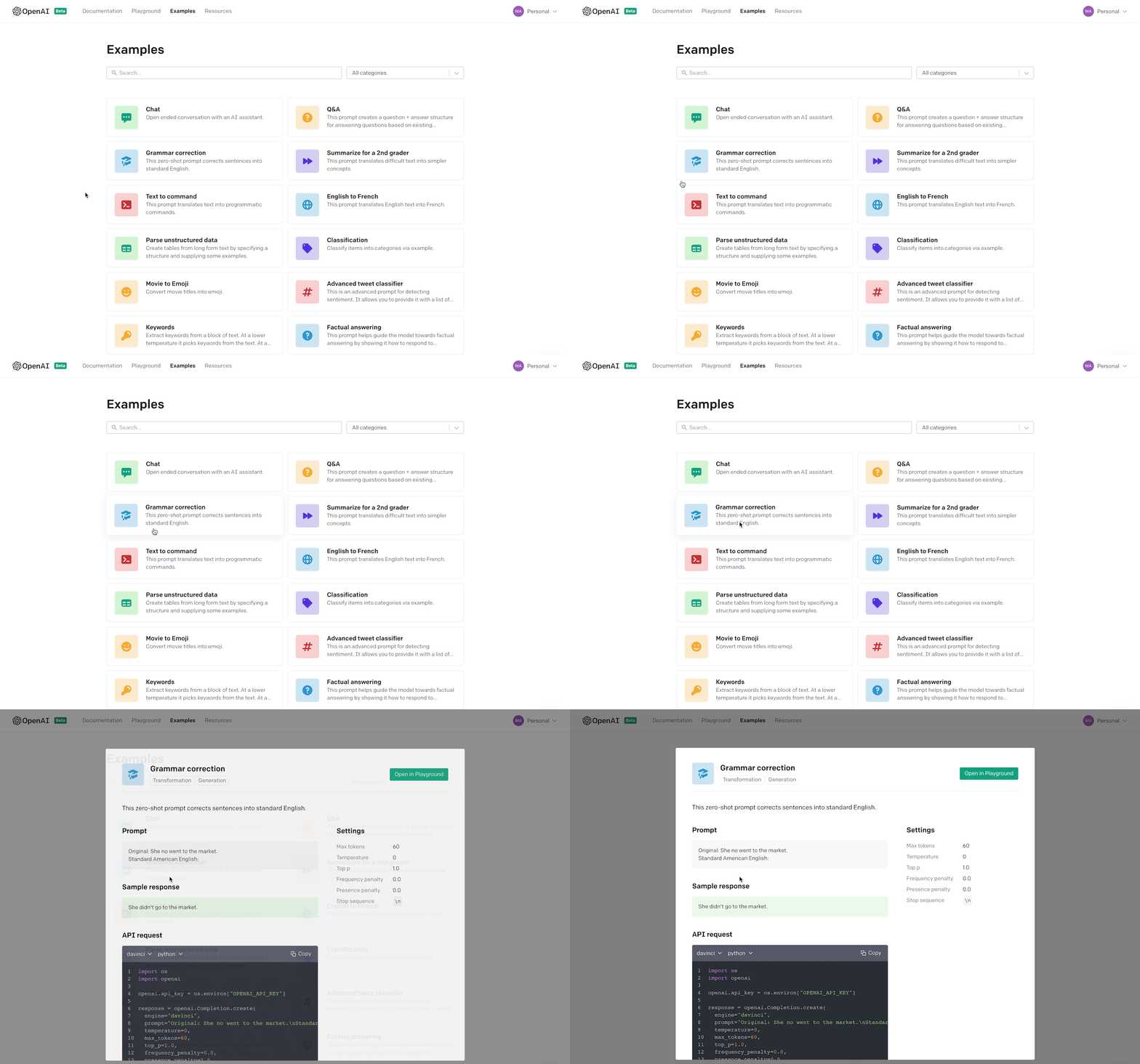
For example, we can use an app called “Explain code”, which uses the code-davinci.002 engine to explain how a piece of programming code works, generating comments in the software.
Today, many companies use OpenAI’s APIs to build AI software (often as SaaS) dedicated to productivity: creating advertising, copy and content, translating, etc.
We can have fun using the APIs through thePlayground environment (https://platform.openai.com/playground). For example, we can enter a web page URL and ask for its content to be summarised and translated into English.
But the APIs are not free: OpenAI gives us an initial credit of 18 dollars, after which we have to pay.
Prices are based on tokens, with different costs depending on the model used. The most expensive is Davinci, which offers 1,000 tokens for 2 US cents.
But how much are tokens worth?
On average, each word processed costs 1.33 tokens. In practice, generating 1K words of content will cost 1,330 tokens, equivalent to 2.6 cents.
From GPT-3.5 to ChatGPT
ChatGPT was born on 3 November 2022 and made available to everyone at the end of the same month.
ChatGPT began as a specific OpenAI application built for conversation and to create a chatbot powered by an AI engine.
To start using it, simply go to https://chat.openai.com/ and register by clicking “signup”.
The procedure is very simple: you are first asked for your email (verified through a link), a password (which you create) and your mobile phone number.
Bear in mind that creating a ChatGPT account effectively creates an account for the whole OpenAI platform. You will also be able to use all the APIs mentioned earlier, with an initial free credit 💰.
This is also why a mobile phone number is required: to prevent the proliferation of temporary accounts used to obtain free tokens.
As we have seen, GPT-3 is a general-purpose language model that does not perform particularly well in conversations. GPT-3.5 models therefore allow us to instruct and fine-tune the algorithm to answer questions and hold a conversation.
As the following diagram shows, ChatGPT starts with certain InstructGPT models/engines (particularly those dedicated to text, such as text-davinci, with some specific changes to the data-collection configuration) and adds a further safety layer.
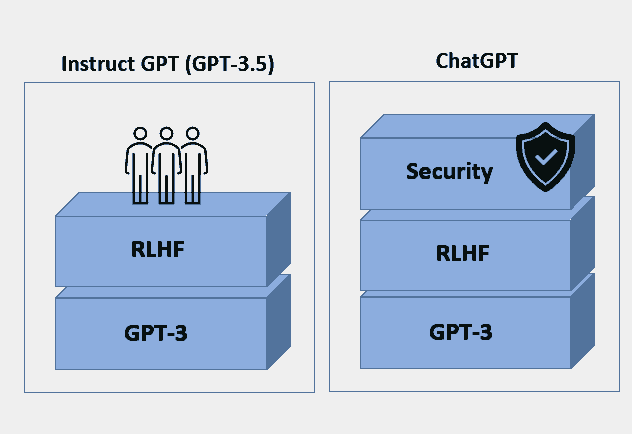
This final layer moderates conversations, filtering inappropriate subjects such as sex, pornography, racist or sexist speech, and illegal, immoral or offensive conversations.
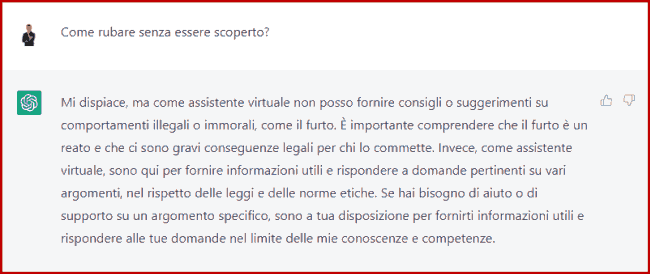
To check how the filter works, simply ask about something illegal, as in the following example, where I entered the prompt: How can I steal without being caught?
Using a computing metaphor, we could say that GPT-3 is an operating system like Windows or Linux, while ChatGPT is an application dedicated to conversation running within it.
What is happening in artificial intelligence is interesting.
Until recently, we were preparing for a range of automatic and repetitive human activities to disappear, as AI would soon replace them.
Recently, however, algorithms have “branched out”, starting to write and draw and entering the world of human creativity too.
Recent news is Google’s forthcoming launch of MusicLM, an AI tool with a prompt-based interface for generating music 🎧🎧 (one of the quintessential creative activities).
In practice, you only need to ask for “dynamic music with a high BPM for a workout, featuring plenty of electric guitar”.
As with ChatGPT, the system will generate our “original” piece.
To generate music, MusicLM uses a deep learning neural network trained on a musical dataset of more than 280,000 hours. We can also co-create by humming a refrain and using the melody as input for training.
As with other forms of creation, as AI’s output evolves we need to think about and recognise the value of the input!
If the algorithm trains on songs by many artists, it will steal their essence and then recombine it. It reminds me of the film Space Jam (1996), in which aliens stole NBA players’ abilities! We need to recognise the value of the trainer, not just the athlete.
I do not know how quickly the law can move and keep up, but it seems to me that we should, on the one hand, indicate that artistic content has been generated by AI (an AI watermark, perhaps showing the percentage of assistance) and, on the other, remunerate the training sources (which is harder to do).
ChatGPT can answer questions and converse on many topics, but to get the most out of it we need to formulate our questions as well as possible.
The discipline of Prompt Design has emerged to teach us how to communicate properly with AI interfaces.
Our questions should provide as much information as possible to help the model understand better.
We need to include two key factors in the question:
- the context
- the objective
Providing these elements increases the likelihood of getting a high-quality output.
We have, after all, spent years learning to search with Google, and have understood that better results require more detail.
We live in an age of abundant answers, where asking the right questions becomes essential.
Unlike OpenAI’s APIs, ChatGPT is free.
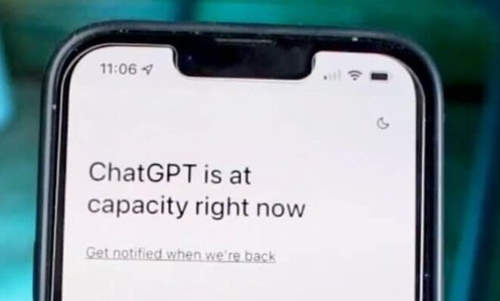
The service’s enormous success has created some problems with access, however. The chat may be slow, or in the worst case you may see the familiar message saying it is unavailable because of excessive traffic (“ChatGPT is at capacity now”).
To provide a consistent level of service (and make some money), OpenAI has also launched a paid version: ChatGPT Plus.
It costs 20 dollars a month and offers three advantages:
- Guaranteed availability even when demand is high
- Faster responses
- Priority access to new features
In addition, since March 2023 OpenAI has launched ChatGPT APIs to integrate into applications and websites. The price is very attractive: 0.2 US cents per 1,000 tokens (in practice, one tenth of the GPT-3.5 APIs).
For example, Shopify is using it to create a personalised assistant that offers shopping advice.
What GPT-4 is and how to use it for free
On 14 March, OpenAI launched the new version of GPT, called GPT-4.
The new version of the AI model is multimodal.
This means that, on paper, it can handle and interpret images, audio and video.
But that is not all: GPT-4 is much more powerful! There are no confirmed figures for the number of parameters it handles. There has been talk of 100 trillion parameters compared with GPT-3’s 175 billion, but this figure has been denied by OpenAI CEO Sam Altman himself.
The underlying neural network certainly handles many more parameters than GPT-3’s.
In practice, what more can GPT-4 do?
It handles images as well as text
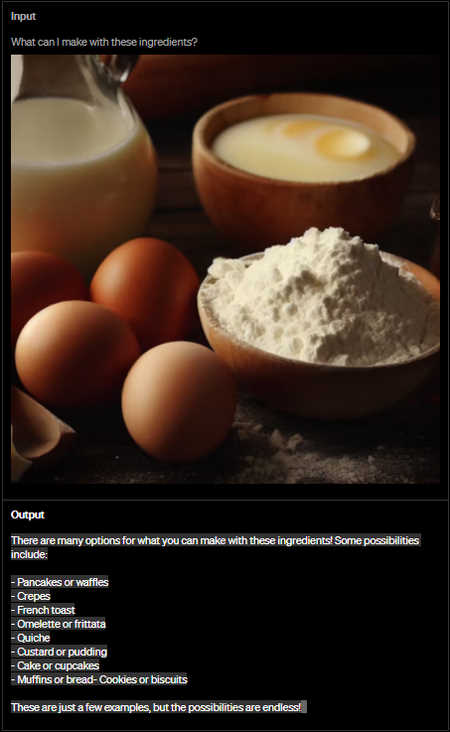
The engine can recognise what images contain. We could therefore give it a photo of some ingredients through the prompt and ask it for a recipe using them (this was one of the examples OpenAI presented during the launch livestream).
The concept of a multimodal approach had already emerged in 2021, when Google announced MUM (Multitask Unified Model) at Google I/O (based on the Transformer deep learning model, the same one used by GPT).
Google uses MUM to understand searches and provide results from multiple sources, in different formats and languages, regardless of the type of input.
In terms of the parameters used for deep learning, we are now at 540 billion with Google’s PaLM (Pathways Language Model).
For now, there is no sign of audio or video handling.
Handling longer texts
GPT-4 can handle more than 25,000 words of text, compared with ChatGPT’s 3,000 (although it would be more accurate to say GPT-3.5).
This allows the engine to create longer content that remains coherent through to the end. Crucially, it can also sustain a longer conversation or handle and interpret long texts.
The number of words it can handle is like the RAM in our computer: the more we have, the better the machine’s processing capabilities (all other things being equal, of course).
Improved mathematical and logical capabilities
One of ChatGPT’s limitations is calculation and the use of logic in certain contexts.
GPT-4 has improved greatly in this area. To demonstrate this, OpenAI gives the example of organising a meeting around the availability of 3 people (see the following image).
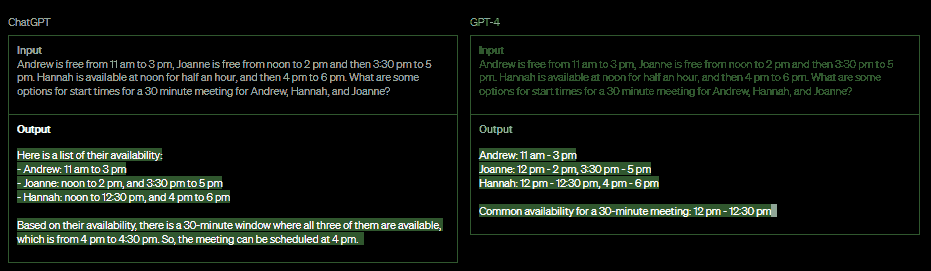
ChatGPT gave an incorrect solution, while the new model can identify the correct time slot.
It is more creative
It performs creative writing tasks better, has improved its writing technique and can learn the user’s style.
How can we use GPT-4?
Today, GPT-4 is available to ChatGPT Plus subscribers (as a model to choose instead of GPT-3.5, with a range of limits).
The APIs are not yet available, and you need to join the waiting list.
But there is a way to get GPT-4 for free that anyone can use (not just programmers), thanks to Microsoft and Bing (in the following video, I explain how to activate it).
Using Bing’s chat also gives us access to a range of capabilities not available in ChatGPT Plus (as shown in the video).
How to use ChatGPT and its main applications
Once we have created an OpenAI account, the best way to learn to use ChatGPT is to use it: ask questions and request tasks.
As I have played with the tool over time, I have realised that it does some things very well, while other tasks reveal the limitations of generative artificial intelligence.
Broadly, we can divide its activities into text generation and general assistance in various areas.
Please note: ChatGPT is blocked in Italy, but all the following use cases can be carried out with Bing’s chat (opened in the Edge browser).
Creating social media posts
In the following example, I asked ChatGPT to write an engaging LinkedIn post about human creativity versus artificial intelligence.
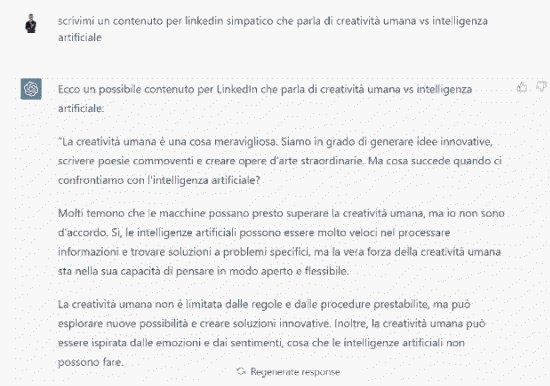
Looking at the output, it makes sense, and it is actually the kind of answer I would give myself.
Personally, I have never used ChatGPT to write a post, because I enjoy creating content from scratch, and posts generated by the engine are also very easy to recognise.
Writing marketing copy, advertisements and ecommerce content
For example, we might want to write a product or service description, create a direct email to customers, or get ideas for an advertising message.
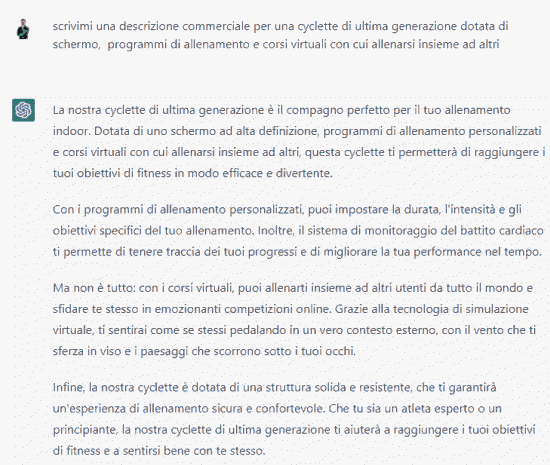
But it can also help with online campaigns.
For example, I asked: “Tell me how to create a paid Facebook ad and what to write to sell a latest-generation exercise bike with a screen, training programmes and virtual classes where you can work out with others.”.
This was the output:
To create a paid Facebook ad selling a latest-generation exercise bike with a screen, training programmes and virtual classes where people can work out together, follow these steps:
- Log in to your Facebook advertising account and select “Create” to start creating your ad.
- Choose your ad objective. In this case, select “Conversions” if you want people to buy your exercise bike.
- Define your target audience. Select people who may be interested in your exercise bike, such as people who enjoy sport or want to keep fit at home.
- Set your ad’s budget and duration.
- Create your ad, including pictures of the exercise bike, engaging descriptions and its unique benefits, such as personalised training programmes and virtual classes.
Here is an example of what you could write:
“Are you looking for the best latest-generation exercise bike for your indoor workout?
Our exercise bike, with its high-definition screen, personalised training programmes and virtual classes where you can work out with others, is ideal for you!
Thanks to advanced technology, you can reach your fitness goals in a fun and effective way without ever leaving home.
Don’t miss the chance to buy the best exercise bike on the market and start reaching your fitness goals today! Click our ad for more information and to buy your latest-generation exercise bike.”
The instructions for running the campaign are correct, and the sample ad is not bad either. It certainly is not outstandingly original, but it can get the job done.
Think of writing descriptions for an ecommerce site with a huge number of products: using this kind of tool can save you a lot of work.
Even more useful is the ability to generate FAQs: answers to frequently asked questions. We feed it the main topics, and the engine produces coherent questions and answers that address our potential customers’ needs.
In the following example, I asked it to create Frequently Asked Questions for the Fastweb mobile product.
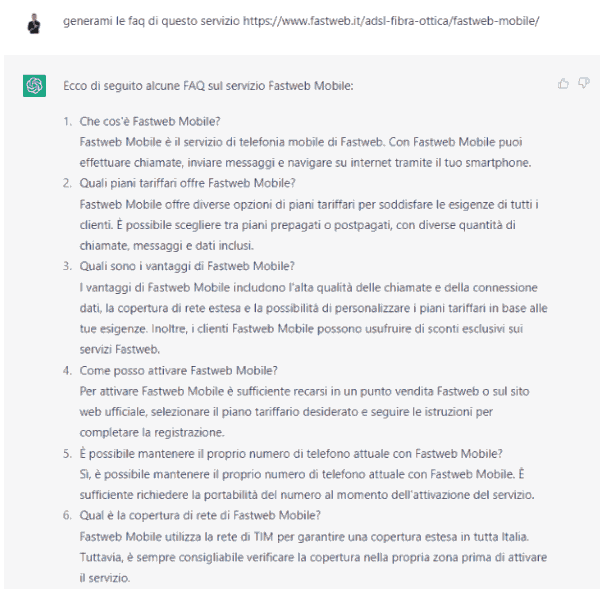
The result is very good, probably thanks to the large amount of data available for training the model.
Clearly, the human task shifts towards checking and making targeted changes to content that is not perfectly written or does not match the objective.
Help with Excel, creating formulas and using digital tools in general
Productivity is perhaps ChatGPT’s most interesting area (particularly with the GPT-4 version).
It can help me use Excel, particularly to build formulas.
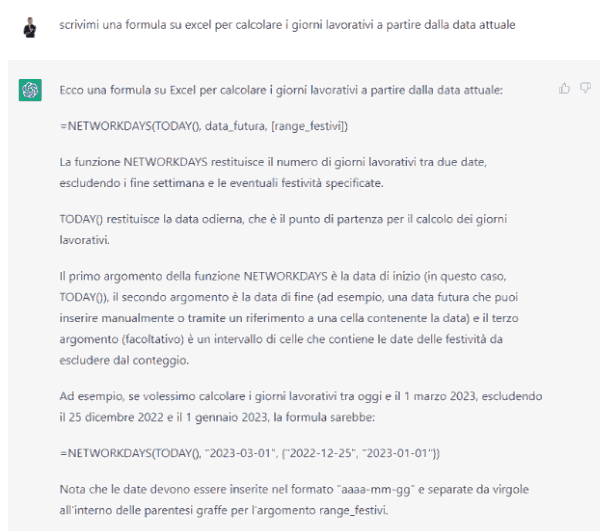
For example, I asked: “Write me the formula to calculate working days starting from the current date.”
The result is perfect. It not only tells me how to write the formula, but explains it and gives examples.
Simulating conversations to learn English
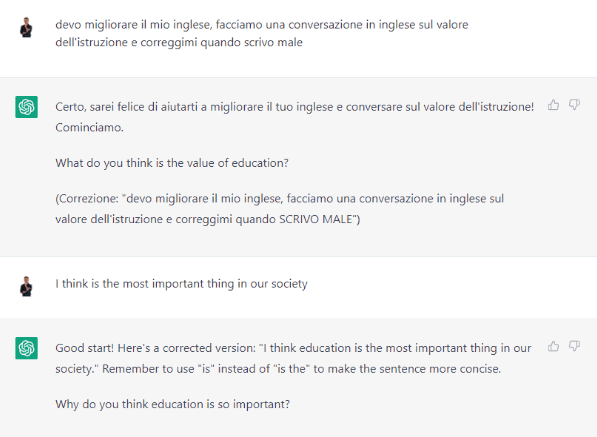
A smart use of an AI chat is as a conversation partner in a language we want to learn, with assistance when we make mistakes.
In the following example, I asked to have a conversation on a particular topic, specifying that it should correct me if I made a mistake.
Simulating an interview or helping an interviewer with recruitment
Simulation can be very useful for a candidate preparing for a specific interview.
Simply provide the context – the company’s market and the position you are interviewing for – and ChatGPT will ask the questions an interviewer might ask. For example:
I have an interview as a Digital Marketing expert for a company in the sports sector. Pretend you are the interviewer and ask me questions about both hard and soft skills. Ask one question at a time and give me feedback on my answer.

Similarly, we can ask AI for ideas for questions to put to a candidate.
Generating titles for articles, films, books, etc.
For example, let’s ask: “Give me ideas for titles for a film about a man travelling around the world by kayak.”.
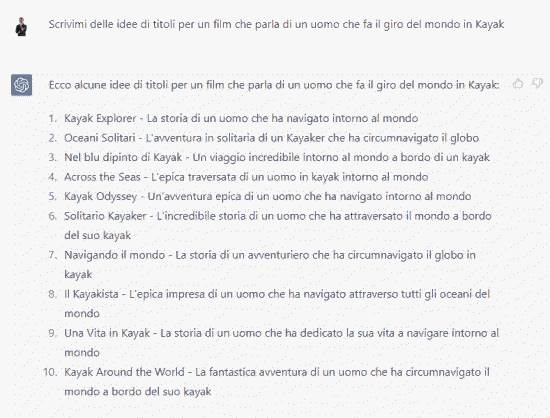
The result is a good starting point to think about.
In the prompt I gave the objective but little context. If I provide more information, we could get a more specific result: “Give me ideas for titles for a film about a man travelling around the world by kayak to escape the routine of everyday life and savour the value of freedom.”.
Among the new results, for example, is the title: Kayak: The Path to Freedom – The story of a man who circumnavigated the world by kayak to live his life to the fullest
Sentiment analysis for social media
Sentiment analysis is a process for analysing and classifying opinions and comments (sentiment) expressed in text across platforms and direct messages (tweets, comments on Facebook, TikTok, Instagram, YouTube, LinkedIn, emails, chats, forums, etc.).
Analysing this content at scale requires specialised software using natural language processing (NLP) techniques to understand the nature of a comment and its position on a topic or company.
The analysis identifies negative, neutral and positive opinions.
In practice, if a comment criticises our product, the system will classify it as negative content. Conversely, if someone thanks us for its quality, it will be considered positive.
Across large quantities of comments and opinions, this data helps us understand what people think about a topic, product or service.
In these analyses, however, watch out for negativity bias and the positive/negative asymmetry effect.
tool-export-commenti.jpg Yotubue contenuto-da-trascrizione.jpg