In the process of building or improving the User Experience of a product or service usability testing plays a fundamental role.
In particular, let us look at what it is and how to use it when evaluating the UX of a digital product (website, app or software) from a Human-Centred Design (HCD) perspective.
What is usability testing? A clear definition might be:
It is the analysis of how people in our target audience behave when using our interface (UI), and the observation of what users do, what they achieve and how they feel.
The aim is to understand whether the objectives the user interface sets out to achieve are being met.
We carry out usability testing for the following main reasons:
- to understand whether the user interface achieves the objectives for which it was designed
- to identify problems, friction and uncertainty when interacting with the interface
- to discover opportunities for improvement through observation
- to understand our target audience's patterns, preferences and ways of acting
Usability tests typically take place at 3 main stages:
- before the launch of a new digital project, to correct any shortcomings (in this case, prototypes or a beta version of the website are used)
- when we need to update our UI (a website or app), starting with the current version to understand its existing problems
- on an ongoing basis throughout our digital project's life, following the Kaizen approach of continuous improvement.
The test may cover our entire website or specific parts (for example, an ecommerce purchasing process).
We can identify the following stages in carrying out a usability analysis plan:
- Defining objectives
- Selecting test users
- Introduction to the test and rules
- Running the test
- Final questionnaire
- Results and summary
Test objectives
As we have seen, the overall objective is to evaluate an interface's usability, but we also typically analyse specific user journeys that are strategically important to the company.
Some examples: analysing how to improve the experience of a customer who logs into a private area to resolve a problem; or understanding whether there is friction in the purchasing flow for an online service or an ecommerce channel.
We could take our website's user journeys and check the happy path and alternative routes.
Once the objectives have been defined, they must be turned into a task list for our test participant to complete.
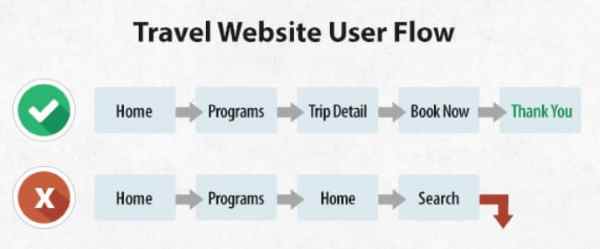 Example of a user flow
It is essential to define the objective clearly so that we can make the most of the time we have with test users.
Selecting test users
When identifying people for usability testing, we need to start with research into the target audience and customer personas (analyses usually already carried out in the marketing management process).
If we have a mountain bike ecommerce website, we will select a young, digitally savvy sports enthusiast, a manager who loves nature but has little time, someone who enjoys Sunday rides with friends and is less digitally savvy, and so on.
One technique for illustrating our target audience and empathising with it is to use customer personas (or buyer personas). Put simply, this means representing the target audience through specific details about the people who make it up.
In practice, we pretend we have to describe our ideal or best customers and give them a face and a story.
The profile description includes demographics, background, lifestyle, hobbies, interests, goals, behaviours and, in general, any information that helps us better understand our customer.

Please note: if we need to improve the UX of an existing dedicated website, it is better not to recruit participants who already know and use the interface, because previous learning would conceal usability problems. Of course, the situation is different when testing a private area and/or working on a prototype before launch.
How many testers do we need for our usability test?
The following formula from Jacob Nielsen can help:
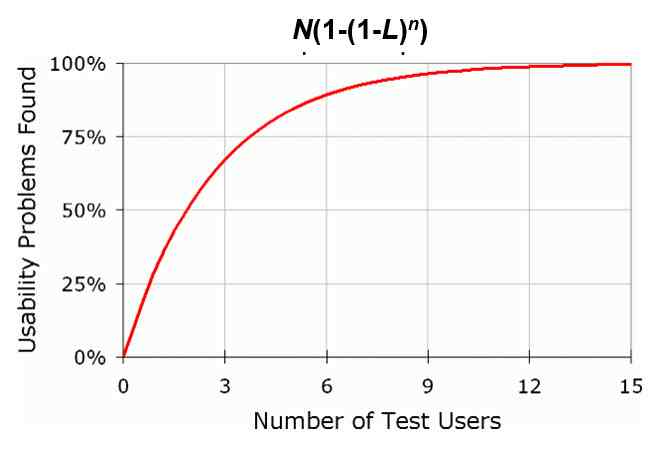
The number of problems found through testing (“Problems found” on the vertical axis) equals:
N(1-(1-L)ⁿ)
Where:
- N = the number of problems we think our interface may have; we set this value to 100.
- L = the probability of each test user finding problems, which Nielsen sets at 31%; in practice, with just one tester we can identify 31% of problems.
- n = the number of participants
This formula and graph show that we do not need a huge number of test participants: with 9 users we can identify over 96% of our interface's problems, and with 15 we reach 99.6%; each additional participant's contribution decreases, approaching an asymptote.
After selecting participants, we naturally need to schedule the test date and time and decide on the gift to provide; it is customary to give a fuel voucher.
The setup of the meeting location is important: there will be a connected PC, a camera to record participants as they act, and screen recording software.
The best setup is a room with a one-way mirror (like those in police interrogation rooms), behind which the project team can observe and listen to the participant.
Please note: remember to have participants sign a recording consent and release form stating that recordings will be used exclusively for the purposes of the test and that participants have the right to review and inspect them before use.
Introduction, participant profile and rules
A key role in running the test is that of the moderator or facilitator: the person who sits beside the tester, listens and gives instructions for carrying out activities and tasks.
The moderator welcomes the participant and completes their profile by asking:
- What work or activities do you do every day?
- Approximately how many hours a week do you use the Internet (web, email, video, social media, etc.)?
- What types of websites and platforms do you use most online, for both personal and work purposes?
- Do you have any favourite websites? Which ones?
This information helps us understand the participant's media diet and their specific level of digital proficiency.
Before starting, the facilitator explains what they will do; in particular, they should say:
- “This is a test of the website, not of you. The aim is to understand whether the interface has usability problems so that we can improve it. You cannot do anything wrong here. In fact, this is probably the only place today where you do not have to worry about making mistakes.”
- “I will ask you to carry out some tasks. As you use the website, I will ask you to think aloud: say what you are looking at and looking for, and before taking an action, tell me what you expect to happen and what you expect to find, for example when clicking a link.”
- “If you have questions as we go along, please ask them, but if you do not mind, I will answer at the end of the session. This is because we are interested in how people behave when they do not have someone sitting beside them who can help.”
Running the test
After the introduction, the facilitator starts giving the first tasks.
It is best to assign tasks in an order that makes sense in a real context. For example, it makes no sense to test a purchase flow without first having the participant browse the product page.
The first tasks will therefore be general. For example, starting outside the website, the tester might be told: “go to the website of brand xx.”
Once on the website, it is a good idea to have the user describe aloud what they see and their expectations of the various areas.
After the initial exploratory stage, whose length depends on what emerges and the facilitator's judgement, we move on to more specific tasks, for example: “can you tell me what telecom operator xx offers for a home Internet connection?”
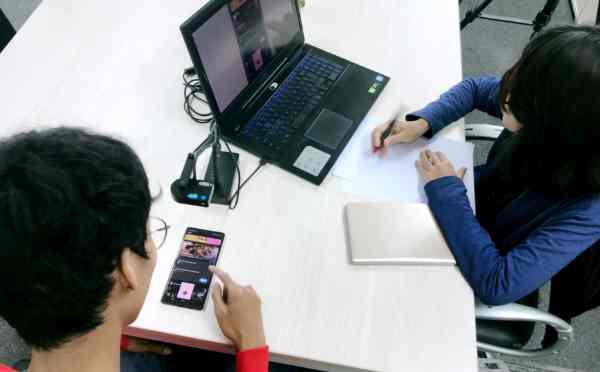 Example of the setting for an app test, with the facilitator on the right
Another more specific task following the user journey might be: “Tell me whether your home is covered by operator XX's service.”
We can go into even more detail, for example: “Can you tell me the activation costs for service xx?”
The tasks clearly depend on the objectives defined when setting up the test.
The facilitator must be good at putting participants at ease, so that they feel free to say what they think calmly and honestly.
Empathy and keen observation should be the moderator's qualities: they must be able to read every small functional and emotional signal from the tester.
Usability testing works very well for identifying friction and how simple an interface is to use. Assessing the emotional component is harder and depends on the facilitator's ability to bring out and interpret these aspects.
A typical mistake moderators make is to steer participants too much through questions towards their own conclusions; questions should draw out thoughts, rather than direct them.
Below is a video of a usability testing session:
A test usually lasts around 60 minutes: beyond that, fatigue sets in, while a shorter test would make too little use of the investment.
Sometimes it can be very useful to have participants test competitors' UIs as well as our own. This helps us understand how the same needs are addressed and whether some solutions are better than others.
Final questionnaire
Once the test is over, the final step is to give the participant a questionnaire to collect feedback afterwards on the overall experience.
We use the SUS (System Usability Scale) questionnaire invented by John Brooke, listing the following 10 statements on a sheet:
- I think I would like to use this website frequently
- I found the website unnecessarily complex
- I found the website very easy to use
- I think I would need support from someone who already knows how to use the website
- I found the website's various functions well integrated
- I found inconsistencies between the website's various functions
- I think most people could learn to use the website easily
- I found the website very difficult to use
- I felt comfortable using the website
- I needed to learn many processes before I could use the website effectively
For each item, users can give a rating from 1 to 5 expressing their level of agreement: 1 means strong disagreement, while higher values mean greater agreement with the statement.

When analysing responses, calculate the final score using these rules:
- odd-numbered statements (1, 3, 5, 7, 9): take the participant's score and subtract 1 (so if the answer is 4, the result is 4-1
- even-numbered statements (2, 4, 6, 8, 10): take the participant's score and subtract it from 5; for example, if the score is 4, the result is 5-4 = 1 (naturally, it becomes zero if the initial value is 5).
- add the scores calculated as above and multiply the result by 2.5
The final value will range from a minimum of zero to a maximum of 100.
A value close to 68 is average, while we enter the excellent range as we approach 80.
Results and summary
The final stage of usability testing is reporting and summarising.
In a presentation document, we will include:
- a summary of the data collected: number of participants, tasks performed, questionnaires administered and user profiles.
- a summary of completed questionnaires
- a detailed description of the tasks performed and success or failure criteria
- a presentation of the problems and critical issues identified while completing the various tasks (also using screenshots and video excerpts from the test), to help improve the interface.
- Suggestions for improving the UX/UI are often provided based on the analyses carried out
Recommended books