
My favourite free tool has added a feature that’s flown a little under the radar. Gemini Notebook can now turn our sources into interactive websites. I tried it with a page about equinoxes and solstices. I wanted to see whether I could explain the seasons by letting readers move the Earth themselves.
From source material to an interactive site
Start with a notebook containing your sources. These might be PDFs, documents, web pages, YouTube videos or Google Sheets. Type “make me a site” in the chat and describe what you want to be able to do. If you’re revising for an exam, you could ask for an interactive periodic table or a historical timeline to explore. If you’re working with a sales spreadsheet, you could ask for a dashboard that lets you compare quarters.
My experiment with equinoxes and solstices
I created a notebook and added a single source, UniqueVisitor’s article on equinoxes, solstices and the length of the day. Here’s what I asked, translated from Italian.
Make me an interactive tool to help me understand the equinoxes, the solstices and all the related phenomena, such as the length of the day.
I found the site in the Studio panel on the right of the web interface, alongside the audio, video and infographic options.
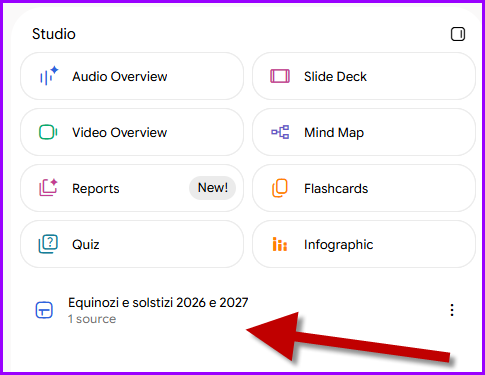
Click the title to open the simulator. Try switching from the June solstice to the December solstice. The Earth moves along its orbit while its axis keeps pointing in the same direction. You can see why it’s winter in Australia when it’s summer in Italy.
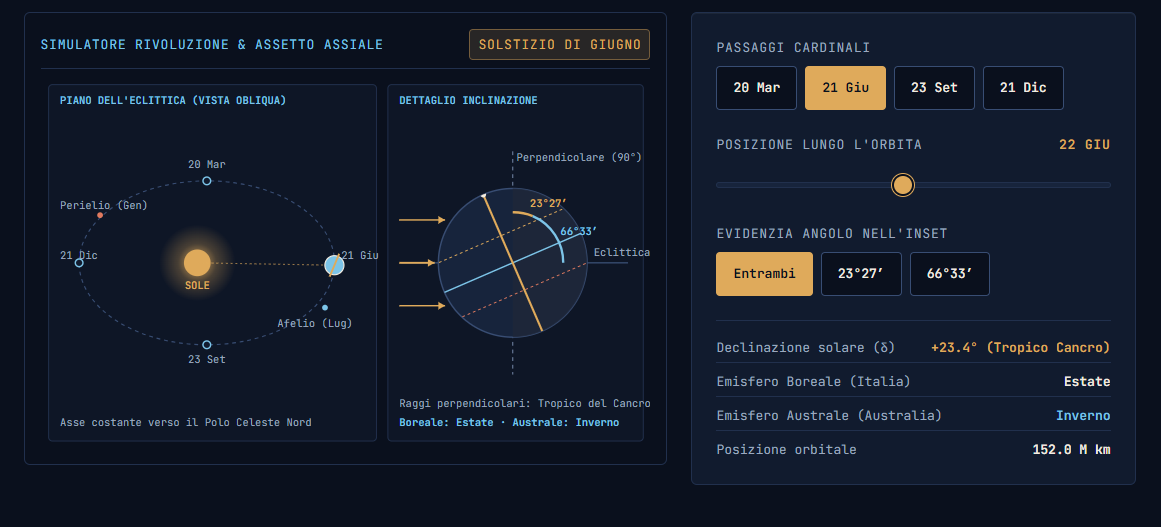
I liked the result. What I particularly appreciated was being able to download the code from the three-dot menu in Studio. I downloaded it and put it on my website so you can try the equinox and solstice simulator.
Editing and sharing the site
To make changes, go back to the chat. In my test, Gemini regenerated the entire site even when I asked it to change just one part. It’s worth putting all your changes in a single prompt. The previous version stays in Studio.
Check your sources before sharing a link from Studio. Anyone who receives the link needs access to the whole notebook, so they can also see the documents you’ve added. It’s worth remembering if you’re working with confidential data.
Google began rolling the feature out worldwide on the web for users aged 18 and over, including Workspace subscribers. In its launch announcement, Google said the feature would also come to the mobile app.
I’d call this vibe coding with subject knowledge. I start with a source I’ve chosen to explain a topic, then decide what I’d like readers to try for themselves. I could have built a similar simulator with Claude or ChatGPT. For me, the appeal is how easy it is to do it in the same place where I keep my material.
I can see students, teachers, trainers and consultants all finding uses for this. A student might want to move the Earth along its orbit. A client might want to switch quarters and see what happens to sales. A teacher might want to show the structure of an atom and how its electrons move.